Forum Discussion

xerez1947
May 14, 2020Brass Contributor
Can't see sender email address (Outlook web)
Hi, I've noticed recently that I am not able to see the sender email address for some emails. Why? How can I fix this? Example: If I place the mouse on the sender I see my own e...

Anonymous
Apr 09, 2021Hi Thank you for your feedback and a lot of work it really helps. There is what is more and more scammers - of course you marked the sender as an attempt to extort because only so it is that you block it and Microsoft has such an email sender in the list = spammer , or is blocked for all Office 365 so it works = but not aware is very much yours

xerez1947
Apr 12, 2021Brass Contributor
Hi, in this case marking the email as phishing and report ir to Microsoft doesn't help. If I do it, Microsoft may block the sender email address, but the real problem would still be there. The scammers only need a new email address to continue their work, while people will still see their own email address or a legitimate email address as the sender email address. This is the real problem here.
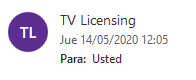
Moreover, in the case of the TV Licensing email, the "From" field has two email address, the scammer's one and my own email address. What would happen if I report that email to Microsoft? Would they block my email address?
By the way, since I updated this case the 9th of April, I have receive two new emails using taking advantage of the same bug.
Moreover, in the case of the TV Licensing email, the "From" field has two email address, the scammer's one and my own email address. What would happen if I report that email to Microsoft? Would they block my email address?
By the way, since I updated this case the 9th of April, I have receive two new emails using taking advantage of the same bug.