Forum Discussion

xerez1947
May 14, 2020Brass Contributor
Can't see sender email address (Outlook web)
Hi, I've noticed recently that I am not able to see the sender email address for some emails. Why? How can I fix this? Example: If I place the mouse on the sender I see my own e...

cengizyilmaz
Mar 25, 2021MCT

xerez1947
Mar 25, 2021Brass Contributor
Hi, thanks por replying, but unfortunately the content of the link is completely useless.
Firstly, as I stated in the title of this discussion, the problem is with Outlook Web, not Outlook for Desktops.
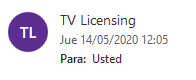
Secondly, as I showed in the in the description I already know how to check the real source of the email. The problem happens on some emails when you hover the mouse over the email. It says that the source is my own email address when in fact it is not. Moreover, when I open the email and I check the "from" field, it only displays a name, but not an email address (Please see images 1 and 4 of the main message of this discussion. It clearly says "TV Licensing" with no email address (this is a phising email) while the legitimate email shows "Yelmo Cines <info@news.yelmocines.net>").
Firstly, as I stated in the title of this discussion, the problem is with Outlook Web, not Outlook for Desktops.
Secondly, as I showed in the in the description I already know how to check the real source of the email. The problem happens on some emails when you hover the mouse over the email. It says that the source is my own email address when in fact it is not. Moreover, when I open the email and I check the "from" field, it only displays a name, but not an email address (Please see images 1 and 4 of the main message of this discussion. It clearly says "TV Licensing" with no email address (this is a phising email) while the legitimate email shows "Yelmo Cines <info@news.yelmocines.net>").