Forum Discussion

Outlook unified all-account
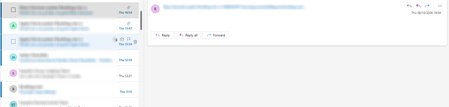

Your screenshot shows the message header and reply controls loading, but no body. Since this started when you enabled the unified inbox and affects specific accounts, first test that feature rather than removing your accounts.
- Turn off the unified/all-accounts view using the option you used to enable it, then fully close and reopen Outlook. Open an affected message from its own account’s Inbox.
- Double-click the message to open it in a separate window. If the body appears there, the issue is likely with the reading pane or combined view.
- Check the same message on the email provider’s website. If it displays normally there, the message itself is intact; Outlook is failing to retrieve or display its body.
If disabling the unified view fixes it, leave it off for now and report the problem through Outlook’s Help > Feedback/Support. Include your Outlook version, the affected account providers, and the fact that your primary Gmail works while the other accounts don’t.
If the issue remains with unified view off, try Windows Settings > Apps > Installed apps > Outlook (new) > Advanced options > Repair, if available. Start with Repair, not Reset, and avoid removing accounts until you’ve confirmed your messages are on the server and saved any unsent drafts.
There isn’t enough evidence to call this a confirmed known bug, but the before-and-after behaviour gives you a useful, specific test.