Forum Discussion

witness777
Apr 04, 2022Copper Contributor
Outlook - Windows Security Pop Up Never Goes Away
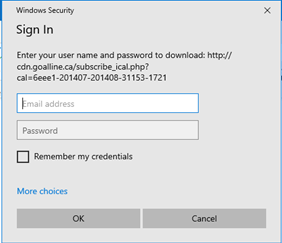
I'm running into a head scratcher type of situation. I have a user who has reported that they are getting a Windows Security pop up from outlook that keeps showing up even after clicking Cancel or si...
- Apr 05, 2022
due to the URI showing 'subscribe_ical' , I`d assume your user has tried to add a calendar event and rather than importing the ICS file only, has added it as internet calendar.
You could check the users Outlook profile by opening the account details on Outlooks´ backstage page.
I think it will show up here and the password prompt should be gone, once the entry has been removed:


AI2
Dec 09, 2025Copper Contributor
If you have teams or outlook, this calendar is in the "shared" folder. Delete the folder so it doesn't automatically pop up again and restart computer. Check calendar again and make sure it's gone.