Forum Discussion

No Emojis In outlook.com
- Sep 11, 2026
Thanks for reporting!
I've been able to repro this and have escalated it to the Outlook team.


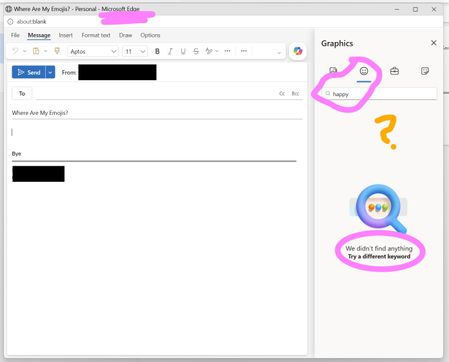
The screenshot shows Outlook's Graphics panel returning no results for an emoji search, rather than existing emoji characters failing to display. Because you can reproduce it in both Edge and Chrome, reinstalling Windows would be premature. As a practical workaround, place the cursor in the message body and press Windows+period to insert a character from the Windows emoji panel. That is an alternative for ordinary emojis, not necessarily for animated graphics or stickers. Next, clear Outlook's search field and check whether browsing its categories works. Compare a new draft in the main Outlook window with the separate compose window shown in your screenshot, then test a browser session without enabled extensions. If the panel still fails, use Outlook.com's Help option to contact support, providing the search term, browser versions, screenshot, and time of the test. These observations do not yet establish an announced removal or confirmed service outag

Hi Jamony:
Many thanks for teaching me this new trick. Win-Period works really well, and gives me quick access to emojis and so much more.