Forum Discussion

How to turn off email forwarding that I did not set.
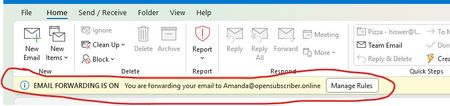

The email forwarding is a business setting usually, but can be used anywhere. If you have a proxy server that you use for security and privacy, then your email would go there and be forwarded to you.
Go to the Outlook website or open the Outlook app.
Click the Settings (gear) icon in the top-right corner.
Select Mail from the left menu, then click Forwarding.
Clear the Enable forwarding checkbox or switch the toggle to Off.
https://www.google.com/search?q=how+do+i+turn+off+email+forwarding+in+outlook&rlz=1C1GEWG_enCA951CA951&oq=how+do+I+turn+off+email+forwarding&gs_lcrp=EgZjaHJvbWUqBwgAEAAYgAQyBwgAEAAYgAQyBggBEEUYOTIHCAIQABiABDIICAMQABgWGB4yCAgEEAAYFhgeMggIBRAAGBYYHjIICAYQABgWGB4yCggHEAAYChgWGB4yCAgIEAAYFhgeMggICRAAGBYYHtIBCTExODYxajBqN6gCCLACAfEFJAQVWLE_oPo&sourceid=chrome&source=chrome.ob&ie=UTF-8#fpstate=ive&vld=cid:a2c86e4f-0f54-4fcc-ba5d-c48323b97ce9_7a0f7a63,vid:f-6jZKbhKaY,st:1
As for experience, I've been working with computers since the mid 1980s and am currently enrolled in the Cybersecurity Specialist field. I do have a little experience with computers in several formats. Enjoy your night/day.
- Dennis5mileAug 25, 2026Silver Contributor
Yeah, I've done all that and gone through every email setting having to do with forwarding..... Still there...
Dennis5mile
- Gypsy_BloodroseAug 26, 2026Copper Contributor
Hi Dennis,
Sometimes it helps to take a step away from a problem for a little while, and go back at it fresh, tends to give you a different POV. MS has so many commands and rules and policies set up in nested formats that often it makes things more difficult to find. You'll get it.
