Forum Discussion

Favorites shared folders not displaying related shared account
- Jan 15, 2026
Update: This is a known issue and has been fixed in Client Version 20260108025 (New Outlook > Settings > General > About Outlook > Client Version). The fix is now being deployed to production and is currently at 30% saturation, will hopefully be fully deployed by the end of this week. Hope this helps.


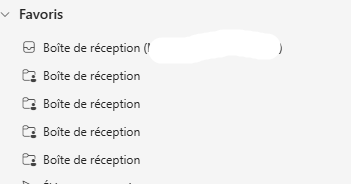
I have an end user with a similar issue. They currently have two mailboxes signed into Outlook on Win11. The 1st mailbox is the user A's mailbox and the 2nd is user B's mailbox. They have it this way so that user A can assist user B with email flows. (Don't get me started on them refusing to use shared mailboxes.) The 1st mailbox shows in the favorites area but the 2nd mailbox does not. If you right click the 2nd mailbox there is a remove from favorites button. Clicking this does nothing and if you right click again the remove from favorites button is still there. If I add a subfolder of the 2nd mailbox to favorites, it will show up but all of the main folders (inbox, sent, etc.) will not show up in favorites. This started about the same time that the names disappeared.