Forum Discussion

Sytske
Sep 25, 2023Brass Contributor
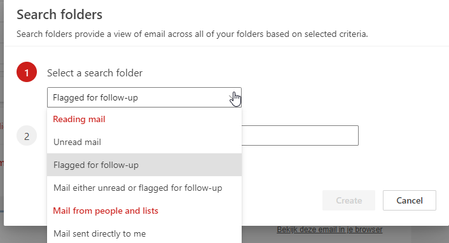
Custom Search Folders in New Outlook
Does anyone know how to create Custom Search Folders in the new Outlook? At this point I only see a couple of standard searches. In the previous version of Outlook used Custom Search Fol...

Bharat Nangia
Dec 01, 2025Copper Contributor
I have submitted feedback on the feedback page listed here for everyone's attention. Co-Pilot gave me a workaround using VBA, and not sure why such a simple search, which is available in most competitive products not available in Outlook - copy of feedback shared below
Add Folder Name Search in Outlook Desktop (Ctrl+Y / Folder Pane)
Description: As an Enterprise Admin managing multiple PST archives and thousands of folders, I find it extremely difficult to locate a specific folder in Outlook Desktop. Even when all folders are expanded in the Folder Pane, there is no search box to quickly find a folder by name. The current Ctrl+Y (Go To Folder) dialog only works for visible folders but does not allow searching across all PSTs efficiently.
Current Pain Point:
- Users often have hundreds or thousands of folders across multiple PST files.
- Scrolling through the Folder Pane is time-consuming and frustrating.
- Ctrl+Y is limited and does not provide a search capability.
Proposed Solution:
- Add a folder name search box in the Folder Pane or enhance Ctrl+Y to allow searching by folder name across all open PSTs and mailboxes.
- Display the full folder path and allow direct navigation to the folder.
- Optionally, include filters (e.g., by PST file or mailbox).
Business Impact:
- Saves significant time for enterprise users managing large archives.
- Reduces helpdesk tickets for “missing folder” issues.
- Improves productivity and user experience.
This feature would make Outlook far more efficient for organizations that rely on PST archives for compliance and historical data.