Forum Discussion

bobbychen
Jun 28, 2020Copper Contributor
Read-only for ios "files"
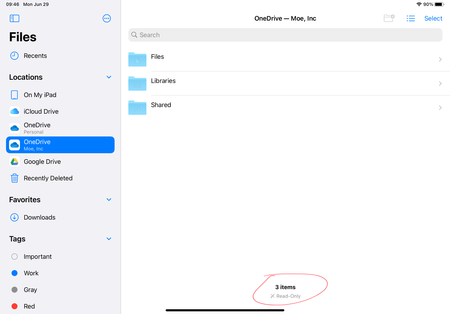
Hi, for my business account, it always shows "read-only" like the below snap. But for other locations, iphone or ipad, it works fine. Please, any help?~ masters~

craigercraig
Mar 22, 2021Copper Contributor
thank you for the workaround, we really just want to use the drive directly. I have too many files and when you start duplicating in multiple places sometimes you update the wrong one by mistake the recent lists are all messed up and the list goes on and on. Just this weekend I had my finance workbook go un-updatable when using ipad and the mac , i had to save a copy of it. something funny is going on and it should work like any other cloud drive. I wish we didn’t have to pay for it when it didnt operate like it should , wouldn’t that be something.
craigercraig
Mar 22, 2021Copper Contributor
does anybody know how to upgrade this discussion to a microsoft incident or get them to look at it?