Forum Discussion

bobbychen
Jun 28, 2020Copper Contributor
Read-only for ios "files"
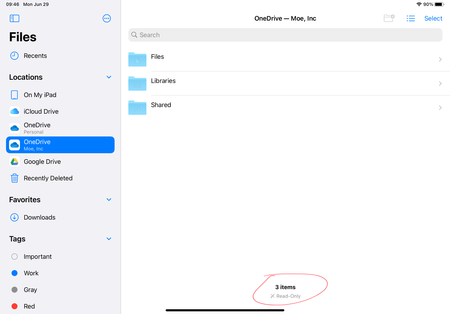
Hi, for my business account, it always shows "read-only" like the below snap. But for other locations, iphone or ipad, it works fine. Please, any help?~ masters~

ClassicalDude
Feb 21, 2021Copper Contributor
The description of the latest update in the app store mentions that the files were made read-only only temporarily, while they were working on something. I believe this is unbelievably irresponsible, especially since Microsoft is hardly a small-time developer, and also considering they switched the permissions to 555 instead of a safe read-only of 400. The only thing a non-developer can do is to contact the app's support by shaking the phone when the app is running, and hope the next update comes out soon.

IgorOzz
Feb 23, 2021Copper Contributor
Yeah, noticed the warning in the OneDrive app as well. But here on my iOS devices (iPhone and iPad) I have write permissions on the OneDrive app, but the problem is on the Apple Files app, with the OneDrive “location”... Is that the same issue you have there, I mean, in the iOS Files App when trading to work with files stored on MS OneDrive?
Cheers,
IGOR.
- ClassicalDudeFeb 23, 2021Copper ContributorThat was exactly the problem. Files imported from OneDrive through the Files app or its extension used to have 606 permissions. Now it is 555. In my app I now copy the files to my app's documents and change the permissions back on the copy.
- IgorOzzFeb 23, 2021Copper Contributor
Interesting part is the “same thing” is working absolutely perfect on a Samsung Android Device, I mean, the Files app on my another device, linked to the same MS OneDrive account is working just fine. Let’s just wait for the MS to update the iOS OneDrive app and/or it’s permissions.
Thanks for your reply.