Forum Discussion

Stuck on "Signing in"
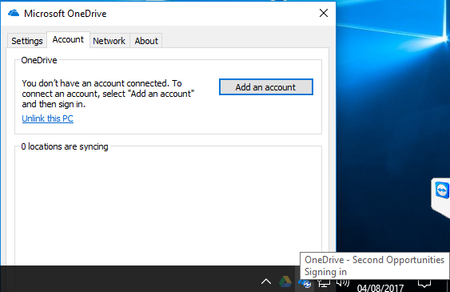

Just curious, but have you gone to oneDrive in the browser and click the sync button, then from the popup there is a link that says install the latest version.
Reason I ask is that, the install from the office365 install, seems to be an older version, depending on your settings and we had problems with it, so I got people to do the above and what it seems to do, is combine, oneDrive and oneDrive for business to use the new sync client. The later versions are also much better. I think what it does is it adds a reg key (see below) that makes it use the new sync.
The reg key is this:
Windows Registry Editor Version 5.00
[HKEY_CURRENT_USER\SOFTWARE\Microsoft\OneDrive]
"TeamSiteSyncPreview"=dword:00000001

We've removed all use of the old sync client (groove). ((We've changed the setting in SharePoint so it only starts the new sync client. We've visited each person that used the old client and upgraded them. I periodically run an audit log trace to find any use of the old sync client.))
So all new client. :-(