Forum Discussion

Stuck on "Signing in"
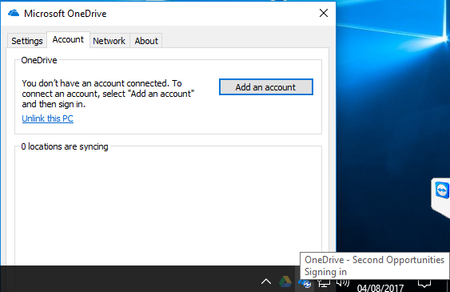

Hey there,
As this is a community for discussion of products. It does not offer support. I would ask this question within the OneDrive community on the Microsoft Community here:
https://answers.microsoft.com/onedrive/forum
Please include the following:
- Troubleshooting steps/methods you have tried?
- Version of OneDrive you have installed on your computer?
- Windows System and Version number?
- Network connection/speed
These will give the community a good head start in providing help for you. Please also be sure to send me a link to your post on the Microsoft Community, so I can jump in there as well.
If you don't know how to ask a question on the community, ask a question is under participate or under your avatar icon.
Regards,

I'm surprised to hear that this isn't a support forum. I'll try and post there next week.
I've:
- stop started OneDrive
- logged off on
- /reset multiple times
- rebooted
- Deleted credentials from credentials manager thingy. (OneDrive prompted for password thereafter.)
Still the same.
- Alan_McFarlaneAug 10, 2017Iron Contributor
OK it's still stuffed. Have ran SARA a few times to no avail. I'm really disappointed in OneDrive SharePoint sync still. We have many clients on Google Drive and some on DropBox and never hear from them[1]. We hear every week about SharePoint (sync) issues.
No support here and when I called 365 support about the re-sync-everything[2] bug, he just sighed and said stop-syncing-uninstall-reinstall-and start from stratch. Not much help really.
[1] Unless someone fat fingers and mistakenly drag-and-drops a folder into another. We quickly can fix that.
 DeletedAug 10, 2017
Just curious, but have you gone to oneDrive in the browser and click the sync button, then from the popup there is a link that says install the latest version.
Reason I ask is that, the install from the office365 install, seems to be an older version, depending on your settings and we had problems with it, so I got people to do the above and what it seems to do, is combine, oneDrive and oneDrive for business to use the new sync client. The later versions are also much better. I think what it does is it adds a reg key (see below) that makes it use the new sync.
The reg key is this:
Windows Registry Editor Version 5.00
[HKEY_CURRENT_USER\SOFTWARE\Microsoft\OneDrive]
"TeamSiteSyncPreview"=dword:00000001- Alan_McFarlaneAug 11, 2017Iron Contributor
We've removed all use of the old sync client (groove). ((We've changed the setting in SharePoint so it only starts the new sync client. We've visited each person that used the old client and upgraded them. I periodically run an audit log trace to find any use of the old sync client.))
So all new client. :-(