Forum Discussion

Random 'Attachments' folder appeared in OneDrive for Business
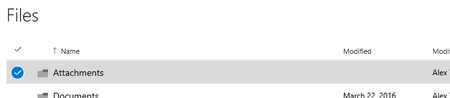

Hi Kevin Zahm
Are you speaking of One Drive for Business or of OneDrive Consumer?
In OneDrive for Business, the folder is called "Attachments" and it is the folder where the attachments are saved from OWA (and it cannot be changed):
Try it by yourself: go to OWA and save an attachment to ODfB:
As you will see, the attachment will be saved (quite obviously...) to the "Attachments" folder in ODfB, regardless of your settings.
Hope it helps...

One Drive for Business.
OWA also used to create an "E-mail attachments" folder, which I was able to prevent.
Your answer is the best so far, but the point is, I would never save to a default destination, and never to a generic "Attachments" folder. I never have, but every time I log on it re-creates the folder. Yes, I delete it every time, its my file structure thank you.
OK, it understand that currently it can't be changed, but it should be possible to change this behavior. I can set the download destination in my browser to "choose every time" I should be able to do the same for my e-mail. It's not a "feature" until it's optional.
 Guilherme FreitasJan 11, 2018Copper Contributor
I'm trying to understand your concern on this, not sure why you are worried about this folder and no matter you remove it will be recreated, it is part of ODFB default schema. Just leave it there.
I think you are misunderstanding it, this is not a download folder, you can download files wherever you like on you storage. This folder is used specifically for automatic online file sharing. In Outlook client, you may attach the file and upload to OneDrive. This folder is part of this logic, when you take this action the file will be stored in the Attachment folder and shared with your intended recipient.
I hope that helps. See attached.
- Kevin ZahmFeb 06, 2018Copper ContributorI don't save to the cloud, I save to my HD and let it sync. I have a "download" option and I use it.
- Kevin ZahmFeb 06, 2018Copper Contributor
The point is, if I save an attachment, I'll decide where to put, not Microsoft. And I will never put it in a default Attachments folder. I make my own folder and file storage scheme and don't need useless visual clutter. It might be fine if you want it, but since I won't ever use, and it's not something I can disable, its a bug not a feature. I don't want or need it, but Microsoft has decided to create it anyways. THat's just stupid.
 B ReichelJan 13, 2018Copper Contributor
My concern about this folder (and the dumb Documents folder) is that I want to control my own file management and don't want to see an empty Attachments folder or the OneNote related Documents folder. I guess it is a Type A thing.
My solution? I made the folder hidden and I keep Hidden Items turned off unless I need to see something specific. Mostly because I have a bunch of hidden dot development files that I do not want to wade through when I am working. But it works great for this as well. Hope that helps the other Type A types.
 JerZawMar 20, 2025Copper Contributor
Omg! It's 2025 and it was still super annoying for me! Thanks a lot for that easy tip haha
