Forum Discussion

mikkele
Jan 07, 2020Iron Contributor
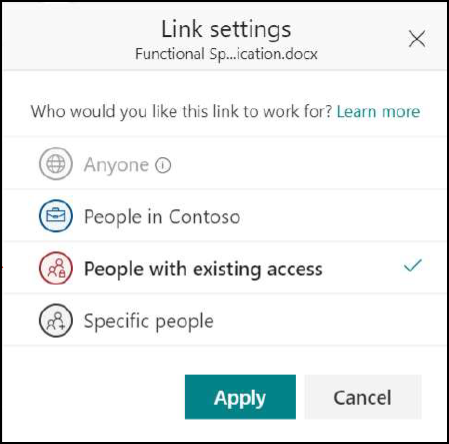
People with existing access - why?
I kind of understand the rationale behind this option, but for end users it doesn't make sense to me. Why would they choose this option in the first place? Even if they knew the recipient has al...
- Jan 13, 2020
Hi mikkele,
Happy to shed some further light here!
The "People with Existing Access" option is often used on Team Sites where users or admins have spent additional time customizing the permissions. In those cases, they may not want to further expand the permissions, but just take advantage of those that exist. It can also be used when sharing particularly sensitive content where you want to ensure that you aren't accidentally giving someone access.
The sliders you are seeing are actually separate from the 4 sharing options in the share dialog. The sliders represent the type of external sharing you want to allow in your organization.
Hope that helps clear things up!
Stephen RiceSenior Program Manager, OneDrive


Joel Parmer
Jan 07, 2020Brass Contributor
mikkele I actually use this all the time when I want to resend out a link to the file or folder to folks. It's very handy.