Forum Discussion

OneDrive won't reinstall after Force Removal with Geek Uninstaller: existing OneDrive instance"error
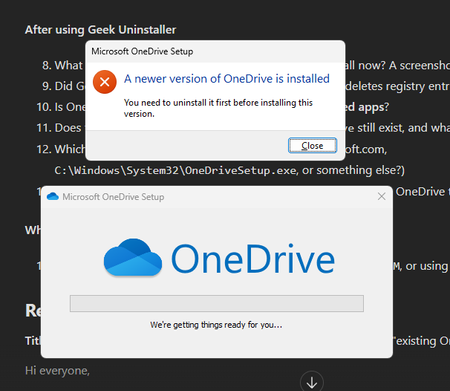

The screenshot specifically says a newer OneDrive version is installed, which is different from merely finding a running process. After forced removal, that does not prove the remaining installation is healthy or locate its registration. Back up any unsynced local files first. Check both the normal Installed apps list and Control Panel’s uninstall list, and inspect whether OneDrive exists under Program Files or Program Files (x86); Microsoft supports per-machine installations there, so an absent LocalAppData folder is not conclusive. If a supported uninstall entry exists, use it and then install the latest desktop sync app from Microsoft. Avoid further registry purges or another third-party forced cleanup. If no supported removal path remains, give support the exact screenshot and installation history instead of guessing which keys to delete. The Store OneDrive viewer is not a replacement for File Explorer synchronization; web access remains a temporary way to retrieve cloud files.
 Kemal1Oct 14, 2026Copper Contributor
Hello everyone, hello Jamony,
Thank you for your insightful remarks about my OneDrive problem.
I have an update for you. I will go through this chronologically.
I backed up all my files from OneDrive.
When I look at the installed apps under:
Settings > Apps > Installed Apps
and search for the OneDrive app, I find nothing.
This was the only Office-related app that I found in my installed apps.
In Control Panel, I cannot find anything related to OneDrive.
When I look for a OneDrive installation in Program Files, I cannot find anything related to OneDrive.
Just to be sure, I checked under LocalAppData to verify that there was no OneDrive installation or folder present. It was empty.
I have not found any valid installation of OneDrive on my PC.