Forum Discussion

gpion
Apr 14, 2026Brass Contributor
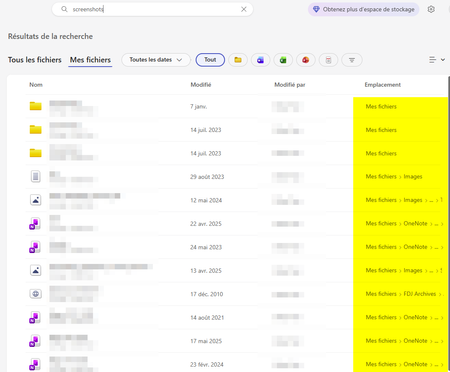
Onedrive Web search : "Location" column always shows "My Files" for folders path
reproducible bug in the OneDrive web search results Summary: the "Location" column systematically displays "My Files" for folders, regardless of their actual location in the directory tree. This do...

NikolinoDE
Apr 14, 2026Platinum Contributor
When two folders share the same name but exist in different locations (e.g., Documents > Projects > Archive vs. Pictures > 2024 > Archive), the search results make them indistinguishable. Users cannot tell which folder is which without clicking into each one.
Until Microsoft fixes this:
- Look at the file results — If a file inside the folder appears in search, its location column will show the correct path, indirectly revealing the folder's location.
- Use the breadcrumb — Click on a folder result, then look at the navigation bar at the top of OneDrive to see its actual path.
- Use OneDrive sync + File Explorer — Search locally through File Explorer (if you sync folders) where the path column works correctly for folders.
Hope that helps clarify things a bit🙂