Forum Discussion

Onedrive readonly (green locks)
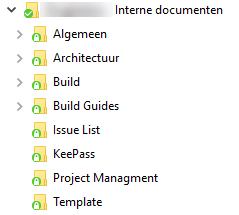

The reason that OneDrive Client (testing with Version 2016 - Build 17.3.6917.0607) sets the files as read only and changes the icon from a green checkmark to a green padlock is that the SharePoint library has at least one of the following:
- Check In/Out functionality feature enabled
- A column set as Required
See in the following sequence of images how the local OneDrive files change from writable to read only when Check In functionality in the source library is enabled.
Folder with files from a library with no check in enabled
SharePoint library with no check in enabled
SharePoint library with no check in enabled - Library Settings
SharePoint library with no check in enabled - Library Settings MenuSharePoint library with no check in enabled - Versioning SettingsSharePoint library with check in enabled - Versioning SettingsSharePoint library with check in enabled
So, the solution to make the local OneDrive files writable is both:
- To disable Check In functionality in the source SharePoint library
- To make all columns not Required

Our user has the same version of sync client however the green lock is still there even though the document library required check out is set to "no". Strange.
- Marco Antonio Alvarez GaribayJun 27, 2017Brass ContributorHi Melissa,
I just updated my post. Seems that setting up a field as Required, causes the OneDrive files to set to read only. - ReubenJun 27, 2017Iron Contributor
Deleted Do you have metadata that is "Required"?
If so, that would prevent the library from being unlocked when synced.
- DeletedJun 28, 2017
The think is, I have 2 document libraries exactly the same. One stores active project documents and the other stores closed or legacy project documents. Same metadata fields, same required fields only the legacy project document library has the green locks.....
- Salvatore BiscariJun 28, 2017Silver Contributor
Deleted
Have you activated Content Approval in the library giving troubles, perhaps?
- Marco Antonio Alvarez GaribayJun 27, 2017Brass ContributorHi Reuben,
I just tested that scenario and is totally true. Setting a field as Required, causes the local OneDrive files to be set as read only too.
- Marco Antonio Alvarez GaribayJun 27, 2017Brass ContributorHi Melissa,
Can you replicate a test like the one I did and try to sync on that' user PC?
Does that library has custom fields?
Cheers,
Marco

