Forum Discussion

Onedrive readonly (green locks)
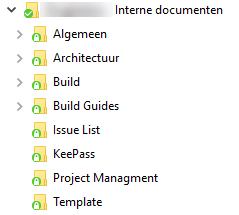

Did you find an answer to this. I have one user with the greed padlock and base on the link provided this could be due to versioning or a required field.
However it is not occuring on other document libraires within the same team site that have required fields and no versioning. The library we have issues with has no versioning but does have required fields. Any thoughts?
-Mel

The green padlocks indicate that the SharePoint document library can only sync in read only mode. You cannot make changes to documents locally synced. In my case this behavior was caused by custom views in the document library. The SharePoint team site was deployed from a template that had customs view (extra columns) in the document library. After removing these custom views the green padlocks disappeared.
- ReubenJun 15, 2017Iron Contributor
I believe this may be my problem as well. I have added some columns and metadata to two document libraries and now they are all locked when syncing. This is a real problem for me.....
- DeletedJun 13, 2017Not applicable
What strange is that it is occuring for one user. And there is a second document library with the same columns that do not have the green locks
