Forum Discussion

Onedrive readonly (green locks)
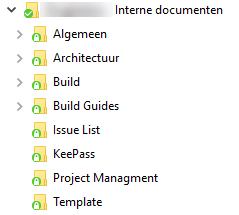

Ok so spent 45 mins on the phone to Microsoft to find out that there is another setting you have to turn off if your using it. (not just the check in feature but the approvals one also!)
"Require content approval for submitted items?" needs to be set to "NO"
This will also automatically set " Who should see draft items in this document library?" to "Any user who can read items"
These options can be found under "Library settings" -> "version Settings"
Hope this helps someone

Hi Oderbang,
Did MS say that this is way the product is supposed to work? Or a "Oops we will try to fix it!" moment?
- OderbangNov 09, 2017Brass Contributor
Dhiran Gajjar They didn't say either.
However what I will say is that they are well aware that the features need to be switched of in order for it to unlock the documents. They also didn't offer an alternative to use OneDrive with those features switched on.
When I suggested i need those enabled they said then you need to use share point online to access the documents.