Forum Discussion

Known Folder Move, error code 0x80070005

I have the same problem. (Same OneDrive build. Windows 10 1803 build 17134.228) So far I've tracked it down to the user having a folder redirection policy applied through Group Policy.
To simplify it I'm starting only with the Desktop folder. My user account had a folder redirection GPO enabled, with the settings "Basic: Redirect everyone's folder to the same location" and the target folder set to "Redirect to the local userprofile location" - With that set, I get the 0x80070005 error trying to Start Protection with KFM.
If I set that GPO to "Not configured", then I can enable protection okay.
My problem is I can't set that just to Not Configured, since those users have previously had an old policy that redirected Desktop to H:\Desktop. So if I just don't configure it at all, the folder will stay on H and KFM complains that it's on a different volume so can't move it.
All I can think of is to enable a temporary GPO for a few days to change the redirection back to C:\, then remove that one and set it back to Not Configured. Obviously not the ideal solution.

Hi Kyle,
Folder Redirection is a pain. If you have it set up (e.g. to redirect to OneDrive) and then change the Group Policy to just NOT CONFIGURED, it could leave the folder redirection to OneDrive in place, which will prevent KFM from working. All depends how you set folder redirection up.
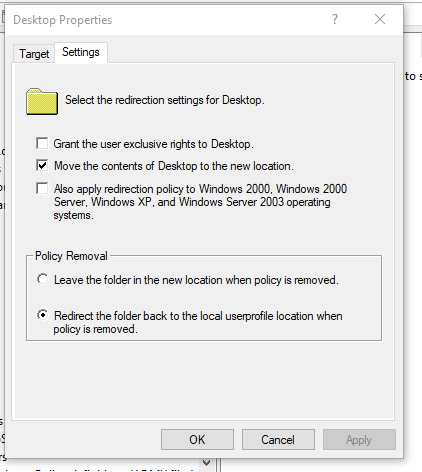
You may need to set folder redirection back to the local drive first, give it long enough for all your devices to pick that up, then turn off folder redirection. Or, if your folder redirection is in a separate policy, you can set it to "Redirect the folder back to the local userprofile location when policy is removed", give your devices enough time to pick that up, and then remove the policy. Devices will then revert back to local drives and cancel the folder redirection. This is what we did to resolve our conflict between KFM and FR.
Hope that helps.
 Jeff RandallOct 05, 2018Copper Contributor
We have tried the "Redirect the folder back to the local userprofile location when policy is removed" setting, verified the GPO has been applied but once we switch the user to an OU that has no Folder Redirection settings it keeps the files in the local Offline Folder directory and not in the C:\Users\<username>\<folder name>.
 Sebastian cerazyOct 11, 2018Brass Contributor
Sadly changing "Prohibit users from manually changing the path..." did not correct the error
User has redirect Folders GPO applied, machine (with loopback) GPO reverts it all back to local drive for user in that machine OU
So in the end it is like no folder redirection happened (confirming by checking HKEY_CURRENT_USER\SOFTWARE\Microsoft\Windows\CurrentVersion\Explorer\User Shell Folders )
Anybody has any better ideas?
EDIT:
Ofcourse it all works fine if NO folder redirection ever happened! (but that is not the point!)
So basically have a setup in that way
- device that is not to use FR has a marker folder in c:\windows & there is top level GPO created with GPP 2 variables based on this folder existence
- FR GPO runs ONLY if the variable is 0 (so it does NOT run on this device!)
- device that is to get rid of FR is in its own lowest level OU
- in that lowest level OU there is machine (with loopback) GPO that reverts it all back to local drive for user
- user logs in once, FR gets reset to nothing
- above GPO is then unliked/deleted from this OU
- after reboot user logs in & OD KFM works a treat!
- Jeff RandallNov 29, 2018Copper Contributor
We did that same thing and it works about half the time. Once we get to that last reboot it seems like we need to do a bunch of reboots and then it works.