Forum Discussion

Change in Files On-Demand behaviour in recent update to OneDrive for Windows
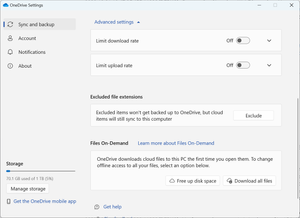

I figured this one out!
You want to navigate to
C:\Program Files\Microsoft OneDrive\Build Number\adm\
Or
%localappdata%\Microsoft\OneDrive\Build Number\adm\
If it is a user installation
Make sure build number is replaced with the build number.
Then you should copy the ADMX file to C:\Windows\PolicyDefinitions.
After that copy the ADML file to C:\Windows\PolicyDefinitions\en-US
With that done you should be able to go to administrative templates then OneDrive and set "Use Files On Demand" to disabled.
After that you should be able to re-open OneDrive and it should work.
I hope this guide helped someone out :).
Also this is my first post on the forum so sorry if its bad
Edit: Sorry I didn't mention that this was on windows 10 the behaviour might be different in windows 11

So, unfortunately the problem still persists as per my original post. It is clearly possible for the previous OneDrive behaviour to still work with the current version of the OneDrive software as my work PC continues to allow 'Files On Demand' to be toggled off with exactly the same version of OneDrive installed.
It is disrespectful of its customers that Microsoft forces these changes on users. Users should be able to select whether they want 'Files On Demand' or not, and not be forced into a change they don't want or need.
- ImNotExpectingJun 13, 2024Copper Contributor
Interesting, maybe Microsoft changed the behaviour as I did this so I could access my OneDrive sync folder through my Linux install. After doing the group policy edit it allowed me to access the folder in Linux. If I didn't do this I would get a error code saying it was unreadable. Also I forgot to mention that it was done on windows 10 so Microsoft may have changed something in windows 11 to make that OS even more worse