Forum Discussion

henriquestefan
May 18, 2020Copper Contributor
Wrong TIme Zone at Microsoft Stream
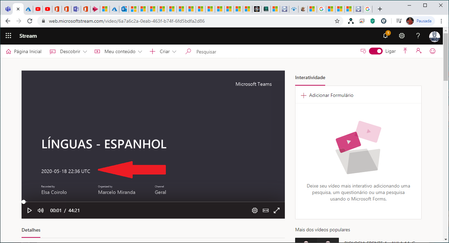
Hello! Would anyone know how to help me change the time zone? Videos recorded in Microsoft Teams are saved to Microsoft Stream with the wrong time zone.
- May 30, 2020It looks like it is in UTC by default. I tried changing the Teams client language and then recording, didn't work. I tried the regional settings, didn't work. Everything was still in UTC.
The solution here is one of two things
1.) You can always trim the end off in Microsoft Stream to remove that notice
2.) Raise a ticket to support
Best, Chris

May 19, 2020
Hi henriquestefan
I don't know whether this will resolve the videos already recorded, but check the following
1.) Microsoft 365 language and time zone settings
https://support.office.com/en-us/article/change-your-display-language-and-time-zone-in-microsoft-365-for-business-6f238bff-5252-441e-b32b-655d5d85d15b
2.) In Teams, make sure in the menu (click on your picture) > settings and make sure the app language is set to your language and this determines the time zone too in Teams
3.) Make sure the time and time zone is correct on your PC too
After these, try recording a meeting and check again. Please let me know the outcome
Hope that answers your question
Best, Chris
I don't know whether this will resolve the videos already recorded, but check the following
1.) Microsoft 365 language and time zone settings
https://support.office.com/en-us/article/change-your-display-language-and-time-zone-in-microsoft-365-for-business-6f238bff-5252-441e-b32b-655d5d85d15b
2.) In Teams, make sure in the menu (click on your picture) > settings and make sure the app language is set to your language and this determines the time zone too in Teams
3.) Make sure the time and time zone is correct on your PC too
After these, try recording a meeting and check again. Please let me know the outcome
Hope that answers your question
Best, Chris
 henriquestefanMay 19, 2020Copper Contributor
Hello Chris,
Everthing its correct, time zone -3:00, at the calendar of teams its fine too.
The only problem it is at the image of microsoft stream before start the record video.
Thank you!
- May 30, 2020It looks like it is in UTC by default. I tried changing the Teams client language and then recording, didn't work. I tried the regional settings, didn't work. Everything was still in UTC.
The solution here is one of two things
1.) You can always trim the end off in Microsoft Stream to remove that notice
2.) Raise a ticket to support
Best, Chris