Forum Discussion

Unable to switch to guest organization
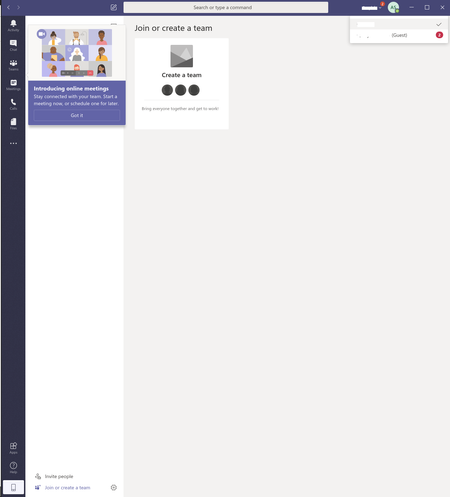
 Jul 09, 2020
mdmrjp Hey, it's really difficult to troubleshoot remote sometimes. Especially when there most likely are different scenarios involved.
But a few general solution steps to follow is to try using a InPrivate browser Window https://teams.microsoft.com and see if it makes any difference. You should also sign out / sign in manually from the top right corner and make sure you're using an updated client if on the desktop app.
If the problem only occurs in the desktop app one could try and reset the Teams client by deleting the cache (entire content in the Teams folder) at %appdata%\Microsoft\Teams (go via Start button). If no luck reinstall the Teams desktop client.
When it comes to this particular issue I am almost certain (as previously mentioned) there is a problem with the account at the guest org. Both of you have said that they have re-invited you but this should be done by.
1. Remove the account from the AAD
2. Remove the account from the Bin as well.
3. Wait a while for things to synchronize.
4. Re-invite you.
If all of this has been done properly and there's still an issue I would like to direct you to the official Microsoft support and open up a ticket, or create another account (if applicable) and have the other org. invite you on that address.
Hope it helps in some way.

alexsod If you don't have any other issues using Teams than with your customers org. it's nothing with your account (I mean in general). They need to fix it (the account problem at their org).
- alexsodJul 09, 2020Copper Contributor
ChristianBergstrom This is my only usecase for Microsoft teams, so since this doesn't work I don't use it at all. I sincerely think that I managed to trigger a bug somehow. There are colleagues of mine working with the same customer that doesn't have this problem. It may be related to me removing my own organization when creating the account, and after that I couldn't log in at all I was just stuck in a loop. Then I had to create another organization from another account and invite my current user to that organization.
 mdmrjpJul 09, 2020Copper Contributor
ChristianBergstrom I have exactly the same issue. The organisation that I am trying to switch to have deleted and re-added me as a guest several times. I can now see a number 4 adjacent to the external organisation on the drop-down in Teams; I don't know what that means, but I still cannot switch to that organisation. Could we clarify exactly what the other organisation need to do to try and rectify this? Thanks.
- ChristianBergstromJul 09, 2020Silver Contributor
mdmrjp Hey, it's really difficult to troubleshoot remote sometimes. Especially when there most likely are different scenarios involved.
But a few general solution steps to follow is to try using a InPrivate browser Window https://teams.microsoft.com and see if it makes any difference. You should also sign out / sign in manually from the top right corner and make sure you're using an updated client if on the desktop app.
If the problem only occurs in the desktop app one could try and reset the Teams client by deleting the cache (entire content in the Teams folder) at %appdata%\Microsoft\Teams (go via Start button). If no luck reinstall the Teams desktop client.
When it comes to this particular issue I am almost certain (as previously mentioned) there is a problem with the account at the guest org. Both of you have said that they have re-invited you but this should be done by.
1. Remove the account from the AAD
2. Remove the account from the Bin as well.
3. Wait a while for things to synchronize.
4. Re-invite you.
If all of this has been done properly and there's still an issue I would like to direct you to the official Microsoft support and open up a ticket, or create another account (if applicable) and have the other org. invite you on that address.
Hope it helps in some way.
 Mitch_buckleyNov 04, 2020Copper Contributor
I have the same issue. I can switch to the guest account on the web version of teams but the desktop app won't. When I select it from the drop down, I briefly see the avatar change and that there are notifications, but I then have the loading screen for a few mins before it fails and then opens back to my team.
I have logged out, cleared cache and uninstalled, restarted PC and then reinstalled. I have also left the guest team from the web version, and requested to be re-added.
Nothing has helped.
This first started happening after upgrading to of office 365. I have a personal microsoft account with the same email now and I believe there is a permission issue.. as my guest invite is probably to my personal/family MS account and my Teams is now on the business plan.