Forum Discussion

JWhiteFEI
Oct 02, 2020Tin Contributor
Unable to add existing list to Lists in Teams channel
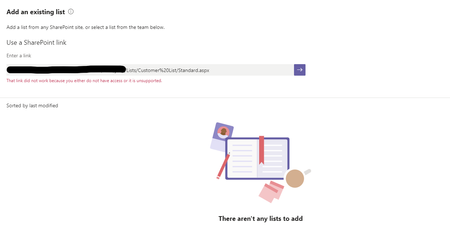
I am having an issue adding an existing list to Lists in Teams. I can add all other lists from this group/site to the desired Teams channel, except this one. I am getting an error: "That link did not...
- Mar 15, 2021
That rings a bell. We created the SharePoint list by exporting from an Excel table. I am sure this is a similar problem, because if I create a new SharePoint list from scratch it is available in Teams Lists. I have found the workaround is to simply use the Website tab and paste in the list URL there. This seems to do exactly the same thing.
Thank you for your reply, Natalie


joeledvina
Mar 30, 2021Tin Contributor
Did you try sharing it in a "Website" tab, as Natalie suggested? That's what worked for me, and it works almost exactly like a List tab. If you created the list by exporting it directly from MS Access or MS Excel to SharePoint, adding it to a "List" tab is not supported. If you are able to add it to a "List" tab for Team A but not Team B, then you might have a different problem.

MTSBob
Mar 30, 2021Steel Contributor
Yes, works using the workaround suggested, and also when adding a SharePoint tab. I'd prefer not to use a workaround so I was wondering whether this is truly documented someplace as "unsupported", or a confirmed bug?
Thanks for your help.
Thanks for your help.
- joeledvinaMar 30, 2021Tin ContributorA StackExchange user purporting to be from Microsoft ("Trinetra-MSFT") stated (without references) that this is unsupported: https://stackoverflow.com/questions/64599675/cannot-add-sharepoint-list-to-teams-tab-when-the-list-was-created-by-exporting-d. These are the only two threads I know of about this topic.