Forum Discussion

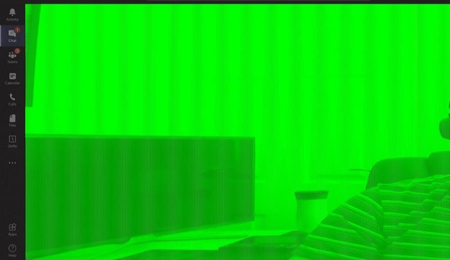
Teams Video Feed Corrupted
 Jan 19, 2021
Found this in the release notes of 461.09
- [NVENC] Colors of webcam video image on receiving end of Skype/Teams/Zoom may appear incorrect [3205912 ]

FinalVinyl Looks like version released today 461.40 may fix the issue per Nvidia. I'm upgrading now and will report back. My issue is with MS teams but I'm hoping it's same fix as for Zoom.
- [X4: Foundations][Vulkan]: The game may crash on GeForce RTX 30 series GPUs. [3220107]
- [X4: Foundations][Vulkan]: HUD in the game is broken. [3169099]
- [Resident Evil 2 Remake/Devil May Cry V] Games which used the RE2 engine may crash in DirectX 11 mode [200686418]
- [DaVinci Resolve]: Error 707, application crash, or application instability may occur. [3225521]
- [Adobe Premiere Pro]: The application may freeze when using Mercury Playback Engine GPU Acceleration (CUDA). [3230997/200686504]
- [Zoom][NVENC]: Webcam video image colors on the receiving end of Zoom may appear incorrect. [3205912]
- [Detroit: Become Human]: The game randomly crashes. [3203114]
- [Steam VR game]: Stuttering and lagging occur upon launching a game (without running running any GPU hardware monitoring tool in the background) [3152190]
- [Assassin's Creed Valhalla]: The game may randomly crash after extended gameplay [200679654]
- NVIDIA Broadcast Camera filter may hang. [200691869]
- [Zoom]: Chrome browser flickers with Zoom app. [200695072]
- [G-SYNC][Surround][RTX 30 series] PC may restart when enabling NVIDIA Surround with G-SYNC enabled on RTX 30 series GPUs. [3202303]
Heres hoping it fixes your issue! In my professional life, I advise fortune 500 companies on video conferencing... So to have my camera look messed up was a "funny joke" for everyone on the receiving end of the call...
FYI, I also saw that Zoom, recently had an update to address color issues, however I believe that was separate to what Nvidia did. So maybe this will fix OP's issue
 Christopher MilkoskyJul 23, 2021Copper ContributorHmm! I don't know what to tell you BrianMilnes. I'm still doing OK. For me, updating my video drivers worked.
 BrianMilnesJun 14, 2021Copper Contributor
Christopher Milkosky
Yes - I saw that - but I didn't mention that this is the latest driver!- BrianMilnesJun 14, 2021Copper Contributor
and, irritatingly inconsistent.
Same PC (after looking (but not changing) at alternate backgrounds)
All seems well !! - Christopher MilkoskyJun 14, 2021Copper Contributor
BrianMilnes - this turned out to be an nVidia driver issue for me. Just update to the latest if you can, and it should work. Judging by the fact that you haven't updated since 2016, I'm thinking it is worth a try. Definitely worked for me and another colleague that had the exact same problem.
Good luck!
- BrianMilnesJun 14, 2021Copper Contributor
Oh, dear!
This is a recent issue for me (two weeks-ish) and is severely annoying.
I have nVidia driver 21.21.13.4201 (Driver Version:342.00 - WHQL Release Date:Thu Oct 27, 2016) on Windows 10 64 bit
So, on the basis I haven't updated my driver, it is either Teams or Windows 10
On the basis that people have been experiencing this problem for a couple of years, then the version of Windows 10 being the problem would appear to be discounted (although I have recently updated to include latest features upgrade.
So my conclusion (FWIW) is that it is a Teams application problem. I'm currently running 1.4.00.11161 which searching shows is the latest stable version.
The problem may be to do with the green screen feature - where you can choose a different background. The attached photo shows that various elements ("layers") have lost their fixed position - boxes that should bound the individuals' do not, component colours are displaying in different areas.
Come on Microsoft - this is giving Zoom another reason for being the preferential client!! - FinalVinylFeb 05, 2021Copper ContributorSame! Such a weird issue. Glad its fixed!
- Ricardo LondonoFeb 05, 2021Copper Contributor