Forum Discussion

Will_073088
Feb 18, 2020Copper Contributor
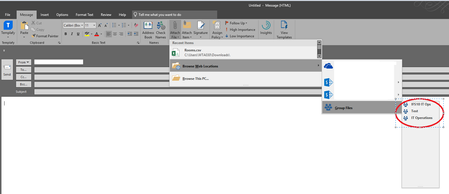
Teams sites are not displaying in Web browse location > Group files
Hi Gents, I'm trying to attach a file from my Team sites through Outlook but not all Team sites are showing in Browse web location > Group files. I'm added as the owner and member of those sites....


Feb 18, 2020
Hi Will_073088
Hmmm, I can't reproduce on my machine as my Outlook does not show Group files when adding an attachment - it simply shows OneDrive and SharePoint team sites. Some thoughts:
1.) Are the teams not showing private teams as opposed to public teams?
2.) Are the teams not showing synced to your local PC so they appear in your OneDrive? Are the teams showing synced?
Let me know how it goes?
Best, Chris
Hmmm, I can't reproduce on my machine as my Outlook does not show Group files when adding an attachment - it simply shows OneDrive and SharePoint team sites. Some thoughts:
1.) Are the teams not showing private teams as opposed to public teams?
2.) Are the teams not showing synced to your local PC so they appear in your OneDrive? Are the teams showing synced?
Let me know how it goes?
Best, Chris
 Will_073088Feb 18, 2020Copper Contributor
ChrisHoardMVP Please see my answers below:
1.) Are the teams not showing private teams as opposed to public teams? - These are private sites
2.) Are the teams not showing synced to your local PC so they appear in your OneDrive? Are the teams showing synced? - My sites are showing in OneDrive - Please see attached. blessardAug 27, 2020Copper Contributor
Will_073088I is a private team, but I am a member and I have sync the Channels group files to my local PC. When I am composing or receive an email with and an attached a file, then select the file --upload-->more-->choose a group--> I see all of my groups but no option to select a folder in that group.
- Feb 18, 2020Hi Will_073088
Have you synced the Teams to your local desktop? In Teams, go to the files tab in the Team and then select 'sync'. Ensure this is done for all the Teams. My thoughts here is that Outlook on the local machine is referencing this locally.
Best, Chris