Forum Discussion

Teams Polls - Where are the results (by name of respondent)?
 Feb 17, 2021
I had also been looking all over for my poll/forms.
Found it here by clicking on 'All My Forms'

JohnBoers I have gone into my Microsoft Forms and the poll I created in a Teams Chat is not showing up. Is there another way to look at responses?
Also created a poll in team chat (Not anonymous; Results not shared), can't see results, only the number of submissions. Poll not showing at all in forms over web. When I create a new tab with poll results it shows only my vote like I'm not the owner. It looks like some kind of bug..
 GalaxyWalkerFeb 09, 2021Copper Contributor
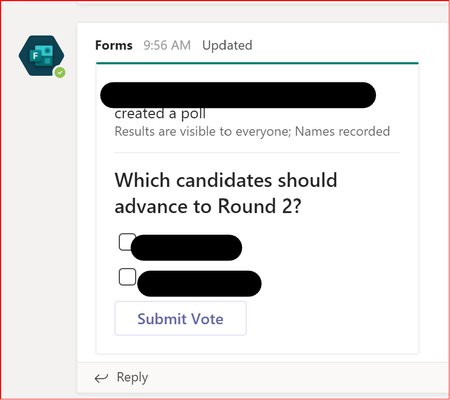
I am having the same issue. I created a poll in a subchannel:
I created the poll as non-anonymous, results are SHOWN. I can see the results but I do not see who responded. I have tried going to forms.microsoft.com but I do not see this form there. I see several others. Within that page, I see a link to the Team, but the Team shows "0 polls"
Seems like a bug.
- chooiycFeb 17, 2021Brass Contributor
I had also been looking all over for my poll/forms.
Found it here by clicking on 'All My Forms' fischerchristinaJul 11, 2024Copper Contributor
chooiyc Update 2024 at https://techcommunity.microsoft.com/t5/microsoft-teams/teams-polls-where-are-the-results-by-name-of-respondent/m-p/4189163/highlight/true#M134762
 jlubonski_FLHSFeb 09, 2021Copper Contributor
ibritvic - I am having the same problem. I have a class poll set to "Anonymous, Results Not Shared" because I do not want the results shared with my students, but I cannot get to them, even as the owner. Was there any solution?
- NitinD645Nov 09, 2023Copper Contributor
Why does teams/MS make a simple task so complex?
- BeeJaalDec 25, 2022Copper ContributorCheck out this videos. It might help
https://youtu.be/YiaSTvghRU0 RhyAnthonyFeb 02, 2023Copper Contributor
BeeJaal managed to find the results and name of submission with the answers above. just wanna say the steps are hideous, can't the poll creator just get the info from TEAMS instead? or get a hotlink from TEAMS that directs to the forms site? having to google to find out how is already a big minus.
- shivangi12Feb 08, 2022Copper Contributor
Hello everyone,
Is anyone having issues with the polls releasing themselves? Like I created draft poll questions for a session and even though I don't click launch on all poll questions, they start launching by themselves like they have a life of their own. Please help me out if anyone has a solution to this.
Thanks in advance!
 GilRoittoJan 18, 2021Brass Contributordoes it work if you go to https://forms.microsoft.com - can you see the form there?
