Forum Discussion

Teams Pinned in Main Window
 Apr 22, 2021
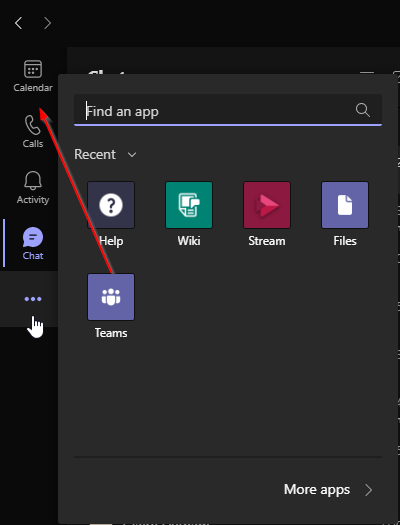
Aha, well in that case it could be restricted by policy and then you have to reach out to your IT admin. The option is called "Allow user pinning".
"Turn on or turn off Allow user pinning, depending on whether you want to let users personalize their app bar by pinning apps to it."
https://docs.microsoft.com/en-us/microsoftteams/teams-app-setup-policies#can-users-change-the-order-of-apps-pinned-through-a-policy

- ChristianBergstromApr 22, 2021Silver Contributor
Aha, well in that case it could be restricted by policy and then you have to reach out to your IT admin. The option is called "Allow user pinning".
"Turn on or turn off Allow user pinning, depending on whether you want to let users personalize their app bar by pinning apps to it."
https://docs.microsoft.com/en-us/microsoftteams/teams-app-setup-policies#can-users-change-the-order-of-apps-pinned-through-a-policy- KurtisM1990Apr 22, 2021Tin Contributor
- ChristianBergstromApr 22, 2021Silver ContributorIt's on apparently. But is that policy also assigned to the user?