Forum Discussion

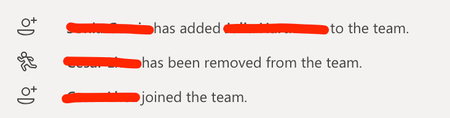
Teams member management without showing actor
- Jul 03, 2019
Hi ChrisElsdon,
There are lots of ways a user can join a team beyond being added by an owner, for example
- Added to the Office 365 Group elsewhere e.g. Planner etc
- Added to the group in AzureAD, by an admin or a dynamic group rule
- Used a join code for the group
- Nominated by another user and approved by admin.
As per Vasil's comment, these messages are just friendly FYI, the AzureAD Audit records for the group show the exact story.

Hi ChrisElsdon,
There are lots of ways a user can join a team beyond being added by an owner, for example
- Added to the Office 365 Group elsewhere e.g. Planner etc
- Added to the group in AzureAD, by an admin or a dynamic group rule
- Used a join code for the group
- Nominated by another user and approved by admin.
As per Vasil's comment, these messages are just friendly FYI, the AzureAD Audit records for the group show the exact story.

Thanks StevenC365,
I think my users don't like the ambiguity that is in the notification. If it showed the source method consistently or nothing consistently I think that would land better than the current notification. Ideally I would remove that notification from posting, but as far as i know there is not a way to stop the joiners and leavers notification showing the the General channel.
- StevenC365Jul 07, 2019MVP
ChrisElsdon add it to UserVoice, there are people who read every idea (I met them).
- ChrisElsdonJul 07, 2019Copper Contributor
StevenC365 looks like someone beat me to it - https://microsoftteams.uservoice.com/forums/555103-public/suggestions/37032145-ability-to-turn-off-member-joined-the-team-notif