Forum Discussion

ChrisElsdon
Jul 03, 2019Copper Contributor
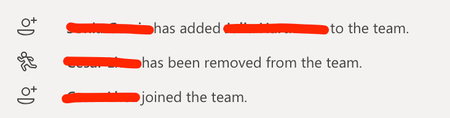
Teams member management without showing actor
In my tenant in Teams when adding and removing Team members notifications of that action appear in the General Channel. The notifications show who has made the change and who has been added or remove...
- Jul 03, 2019
Hi ChrisElsdon,
There are lots of ways a user can join a team beyond being added by an owner, for example
- Added to the Office 365 Group elsewhere e.g. Planner etc
- Added to the group in AzureAD, by an admin or a dynamic group rule
- Used a join code for the group
- Nominated by another user and approved by admin.
As per Vasil's comment, these messages are just friendly FYI, the AzureAD Audit records for the group show the exact story.


VasilMichev
Jul 03, 2019MVP
You shouldn't rely on these messages, use the proper audit records in the SCC: https://docs.microsoft.com/en-us/office365/securitycompliance/search-the-audit-log-in-security-and-compliance#microsoft-teams-activities

ChrisElsdon
Jul 07, 2019Copper Contributor
Thanks VasilMichev for the info, don't worry we don't use this info for any audit, its more that my users have been asking why its different! I couldn't find any concrete info on the MS site to point them towards... hence the Q.