Forum Discussion

Teams HAL driver update skips coreaudiod restart mediaremoted spins at 100% CPU
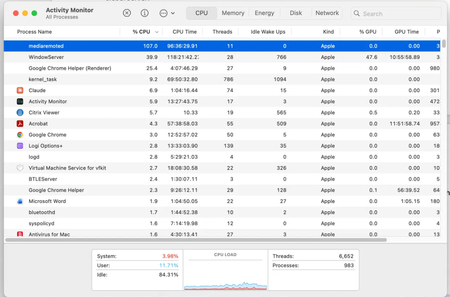

Your evidence connects the MAU update, replacement of the MSTeamsAudioDevice HAL plug-in, and mediaremoted at 107% CPU. That makes a stale Core Audio state a credible explanation, although the screenshot cannot prove an installer defect or guarantee that restarting coreaudiod is the product fix. For a supported recovery, quit Teams and restart macOS; this reloads Core Audio and dependent daemons without manually killing protected processes. Then install the newest Teams and Microsoft AutoUpdate builds and watch Activity Monitor after the next update. If the spin recurs, collect Teams support files using Help > Collect support files, plus the macOS install log, a process sample of mediaremoted, UTC occurrence time, and before/after Teams versions. Open a Microsoft 365 admin support case and attach that evidence. Keep force-quitting daemons only as a temporary diagnostic workaround; Microsoft must confirm and correct any post-install issue