Forum Discussion

Gerard2080
May 28, 2020Copper Contributor
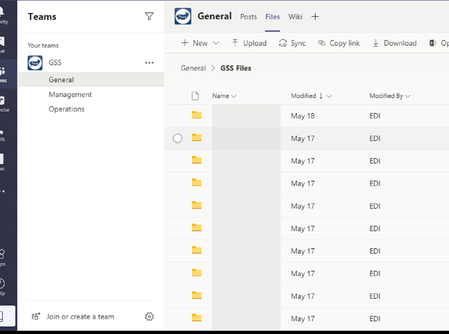
Teams folders not showing name
Has anyone seen this issue where the Folder names are not showing? Have closed / signed out of teams. Windows is up to date except for the optional 2004.

Gerard2080
May 29, 2020Copper Contributor
Hi, thanks for the suggestion, but this is the desktop app

ChristianBergstrom
May 29, 2020Silver Contributor
Gerard2080 Hello! Alright, try deleting the Teams desktop cache then.
Go to this location AppData\Roaming\Microsoft\Teams (you can be selective but just delete the entire Teams folder).
If you're a Mac Library/Application Support/Microsoft/Teams
- Gerard2080May 31, 2020Copper Contributor
Have done this. It's windows based PC. Have also tried reinstalling. Issue remains
- ChristianBergstromJun 01, 2020Silver Contributor
Gerard2080 Have you verified this on another computer with the desktop app?