Forum Discussion

Teams Audio Conference PSTN & Extension Invite via Direct Routing Failed
- Sep 08, 2019
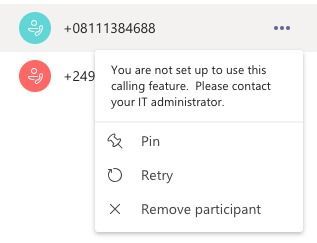
currently the 3-way PSTN conference still requires Audio Conferencing and once you invite third party into conversation you basically do Dial Out as Audio Conference from Teams meeting. You recognize that easily that calling number to third party is not your Teams user but conference bridge pilot number.
I believe Microsoft works on that and promised to allow 3-way PSTN conference only with Phone System license but so far this is not possible without Audio conference add-on. Pitty right...Microsoft is giving us regular old fashion VoIP features like big news of this century and it takes some time. Lets wait for it, still I believe it will be legendary 😄

currently the 3-way PSTN conference still requires Audio Conferencing and once you invite third party into conversation you basically do Dial Out as Audio Conference from Teams meeting. You recognize that easily that calling number to third party is not your Teams user but conference bridge pilot number.
I believe Microsoft works on that and promised to allow 3-way PSTN conference only with Phone System license but so far this is not possible without Audio conference add-on. Pitty right...Microsoft is giving us regular old fashion VoIP features like big news of this century and it takes some time. Lets wait for it, still I believe it will be legendary 😄
- Adityo Prabhaswara H.Sep 09, 2019Copper Contributor
Hi DaveChomi,
Hmm, I thought it was dialed out via Direct Routing but Audio Conference license instead, then pop-up message related to calling feature is true. I believe that it is not only applied to 3-way conference but generally speaking to all conference, isn't it?.
Actually, I do not want and prevent using any additional Teams add-on except "Phone System". I also believe that whether I have audio conference license or not, I still cannot invite IP/PBX extensions although integration works perfectly.
Thanks for your help.
 MufarakSep 08, 2019Copper Contributor
HiDaveChomi , Yes me too facing same issue even with Audio Conference License applied.
Can you guide me if there is anything spcl to configure in audio bridge and user level. All my users on E5 with Audio Add on & E3 with Phone System + Audio Add on.
Still issue there
- DaveChomiSep 08, 2019Iron Contributor
Then what is in my mind to check is the dialing out policy for Audio Conferencing.
I have on my user OnlineDialOutPolicy : DialoutCPCandPSTNInternational
which means I can dial out from conference also international numbers. And if I have MS calling Plan it will allow me also to dial out PSTN calls over Calling Plan.
