Forum Discussion

StephanGee
Dec 14, 2020Iron Contributor
Teams Aadsync adding and deleting users - known issue but no official documentation
Hi everyone, this is happening a lot and there is still no official document about this. What exactly does the Teams Aadsync? I have a team where it added 8 users then removed 2. All users w...
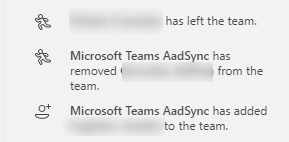
- Dec 14, 2020
Found the action that triggers that information.
If you want to add the permission to a library but you go with this entry point:
Then you add some users as "members" - they seem to be added to the AAD group but not yet to Teams.
Short time later:
Mystery solved 🙂 Thanks for your directions

StephanGee
Dec 14, 2020Iron Contributor
Found the action that triggers that information.
If you want to add the permission to a library but you go with this entry point:
Then you add some users as "members" - they seem to be added to the AAD group but not yet to Teams.
Short time later:
Mystery solved 🙂 Thanks for your directions

ChristianBergstrom
Dec 14, 2020Silver Contributor
Hi, great that you found out your trigger. But the article do mention it.
”Typically, the changes flowing through the pipeline are made to groups via admin centers, Exchange Online, SharePoint Online, or PowerShell modules.”
Before the Teams AadSync was introduced these changes was displayed as ”random owner has removed/added bla bla”. You’ve probably noticed that.
”Typically, the changes flowing through the pipeline are made to groups via admin centers, Exchange Online, SharePoint Online, or PowerShell modules.”
Before the Teams AadSync was introduced these changes was displayed as ”random owner has removed/added bla bla”. You’ve probably noticed that.