Forum Discussion

"Someone has already setup Teams for your organization"... With Office 365 Account
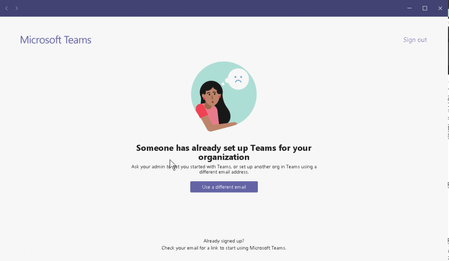

Is the OS you're installing/uninstalling on, Windows 10? I know you mentioned "Credential Manager" but if it is Windows 10, have you checked on the "Email & Accounts" settings? If the account is listed under "Accounts used by other apps" maybe "manage" that, or remove it and try again? Just a thought.
Edward

EFDake Sorry. I forgot to say that it's a Windows 7 Pro computer.
- Sep 06, 2019What happens if you try clicking use another email address. It sounds like your user has a Microsoft account that matches their office 365 account and it’s conflicting. When the user does incognito to teams and tries logging in do they get the prompt to use personal or work account?
- John StoddartSep 09, 2019Copper Contributor
In an inognito window, the user is prompted with which kind of account with which they're signing in. He selected Work and got into Teams on the Web. Afterwards, trying to log into the Teams desktop application, we get the same screen as shown above. It's a super odd issue.
- Sep 09, 2019
I would have them go and change the personal account login for their Microsoft account. Assign it a new @outlook.com for the login on that account and set it as the default. Then make sure you sign out on Teams after a bit, and try logging in again, it should then use the work account since the login name isn't used on the personal account anymore.
The link to that page is: https://account.live.com/names/Manage?mkt=en-US&refd=account.microsoft.com&refp=profile
