Forum Discussion

Setting External access options via powershell
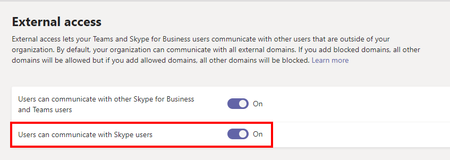

mskrgulja Hello again, I agree. The GUI should show what setting is set. Please verify the settings if you are on-premise, online or hybrid.
https://docs.microsoft.com/en-US/microsoftteams/manage-external-access?WT.mc_id=TeamsAdminCenterCSH#enable-federation-between-users-in-your-organization-and-consumer-users-of-skype
*edit* just want to add that this preview has not been very well managed. It was rolled out and withdrawn etc. I'm doing some testing of my own and it doesn't look as it should, meaning the GUI says one thing and PowerShell another. So perhaps it isn't working properly now either. Please let me know if it is any difference when following the above prerequisites for Skype consumer federation.

Hi.
I did verify the setting (AllowPublicUsers and EnablePublicCloudAccess), and it's set as I left it (the change I made with powershell is applied, but not in the GUI).
I also experimented changing the setting directly in GUI (flipping the switch) but the underlying parameters (CsExternalAccessPolicy -EnablePublicCloudAccess) did not change.
Is there a bug possibility (since Communicate with Skype users is label "in preview")?
Thank you.
Br
- ChristianBergstromSep 15, 2020Silver Contributor
mskrgulja See my edit above 🙂