Forum Discussion

Teams messages search function does not show full conversation
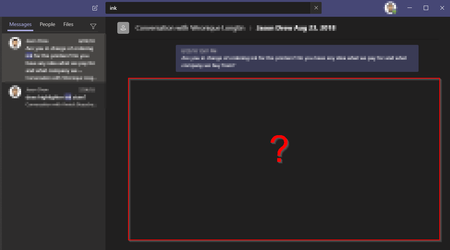

To reiterate; There seems to be no way to "go to message" in the history when searching for a message in a chat. The message is displayed in the right discovery pane however there is no history displayed around the message.
process:
open chat, Ctrl+F, type search phrase, press enter, results are displayed on the right (however no surrounding history is displayed, just the exclusive search results)
I can only think of one workaround which is to "Pin" the message and then use the Pin to find the message in the chat history. However, you can only have 1 Pinned message per chat which is another problem.
For example; I asked my colleague a question I wish to remind myself the answer to months later. I remember the question but not the answer. I search for the question phrase which just returns my question and the date it was posted. What I wish to see however is the response to the found question in history. I am forced to either jot down the date and time and manually search through the history or Pin the message, removing any existing Pin to then jump to the message I am looking for. I might have to do this multiple times if there is more than one result.
Quite honestly, how often would you be searching for something you already know?
Why can't we search for a message within the history of the chat? At the least, we need a "Jump to message" option.
and why can't we have more than one Pinned message? I like the Pin feature but limiting this to one Pin per chat makes it pretty pointless. For example, it would be ridiculous if I could only flag one email at a time.

Aaron_Clarion We have posted a workaround for this a few times now - pop out the chat first, then retry the search and go to message.
- phlyxAug 09, 2022Iron ContributorOnly a work around for CHATS!!! Does NOT work for messages in Teams channels.
- Chasal777Aug 09, 2022Copper Contributor
ph_ly this is NOT a workaround.
1/ the scroll back feature is buggy. It’s laggy, often displays messages in the wrong order. It doesn’t really allow to scroll back too far. Contrary to what we used to have with Slack, before Microsoft imposed it’s buggy software to every manager they work with in the city.
2/ how do you know exactly to where you have to scroll back ? It can be months backs.
This is not a workaround. It’s just to make us look picky and to minimize the actual multi faced issue.
- ph_lyAug 09, 2022Steel Contributor
Chasal777 it jumps you straight to the message with context, if you follow the steps we have posted several times.
Please actually try it.
- phlyxAug 09, 2022Iron ContributorIt sounds like most people in this thread don't use Teams for Teams channels, just for private chat sessions. We use it as a business communication platform where finding previously posted project information is massively important. Our work environment is a Teams channel for each project and each department, and we only use chat for side conversations not directly work related. So when we search, the things discussed in private chats are never what we are looking for. So work arounds for chat do not help us one bit and no one has posted a work around for Teams channels. We used to use Slack (which many of us still use on the side) and the search works perfectly. No work-arounds needed. And yes, if we had a choice we would go back to Slack but decisions were made above our pay scale to save a few buck$, Teams was the cheap solution and we're getting what we (didn't) pay for.

