Forum Discussion

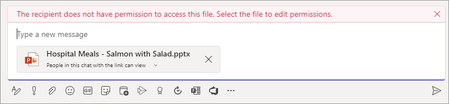
Misleading mail tip when attaching OneDrive file to Teams chat
- Nov 18, 2021
Hi folks,
We have a fix for this in-progress and expect it to be rolled out in January! Thanks!
Stephen RiceSenior Program Manager, OneDrive


m36five Michael Bourgon Hello again, not sure if you've seen this from Message center so I'm attaching it. The info was published October 28th, but still showing status "rolling out" in the roadmap. My guess is that it's not completed and that's why we see different behavior.
"We are updating the file sharing and access control experience in Microsoft Teams to make it similar to the experience with other Microsoft 365 apps. We had announced (MC218732) this feature last fall but delayed the rollout to ensure the best customer experience.
We apologize for any inconvenience that this delay may have caused and are working to ensure we provide timely updates in the future.
When this will happen:
This is now available for all organizations.
How this will affect your organization:
With this update, when users share a file from within Teams (desktop/web), they will have the option to create sharing links that provide access to:
- anyone
- people with existing access
- people within your organization
- specific people, including those in a 1:1 chat, group chat, or channels.
Before users share a file in a chat and channels, they will be notified if recipients don't have permission to view the file. The user can change permissions before they share the file (if they have permission to do so).
What you need to do to prepare:
Teams honors the sharing controls defined in SharePoint. For example, if external sharing is disabled in SharePoint, then it is disabled in Teams as well.
The default file link permission in Teams will be the same that is set at tenant level, unless that setting has been overridden at the respective SharePoint site level.
Review your file sharing options in the SharePoint admin portal to ensure that they align with the requirements in your tenant."

- StephenRiceNov 18, 2021
Microsoft
My pleasure!
I'll be sure to let the team know that they've saved countless customers from sleepless nights 😉
Stephen Rice - Nov 18, 2021
StephenRice Brilliant, I just knew something was wrong considering the inconsistencies. Didn't think about it as a fix needed but rather a not fully completed rollout. Anyway, great news!
Everyone else, now we can sleep at night ;D
- m36fiveNov 18, 2021Steel ContributorThat is fantastic! Thank you so much for helping with this.
- StephenRiceNov 18, 2021
Hi folks,
We have a fix for this in-progress and expect it to be rolled out in January! Thanks!
Stephen RiceSenior Program Manager, OneDrive
 DSEGONov 17, 2021Copper ContributorHello StephenRice
I wanted to reach out and see if their has been any updates.
We are also seeing this message. I have to agree that the message is misleading and feel this will be an issue for others as well.- StephenRiceNov 02, 2021Hi folks,
Thanks for the tag! I'll forward this thread over to the right owners so the team can evaluate & see what's going on. Thank you!
Stephen Rice
Senior Program Manager, OneDrive - Nov 02, 2021
Okay, the short version. Either the feature isn't really completed or this is what the experience look like when using "People in this chat" or "Specific people" (same thing) as that option is a more restrictive sharing permission which prevents broad internal sharing. Still I don't get the same info-banner as m36five trying to reproduce.
