Forum Discussion

Daniel Westerdale
Jul 02, 2020Iron Contributor
Manifest issue with:No-code solution to expose SharePoint pages in Microsoft Teams as a personal app
I have been trying out Vesa's https://www.youtube.com/watch?v=G73jxqtjuIE . In my version of App Studio running in the web client, the system auto creates and about tab. The intranet ...
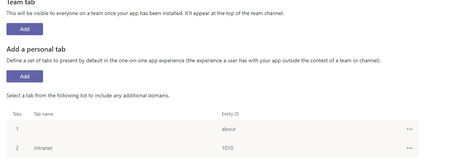
- Jul 03, 2020
Update as staticTabs as below and re-upload the solution.
 "staticTabs": [
        {
            "entityId": "Home Tab",
            "name": "Home",
            "contentUrl": "https://<your-tenant>.sharepoint.com/_layouts/15/teamslogon.aspx?SPFX=true&dest=/sites/SPDemo",
            "websiteUrl": "https://<your-tenant>.sharepoint.com/sites/SPDemo",
            "scopes": [
                "personal"
            ]
        }
    ]


Daniel Westerdale
Jul 03, 2020Iron Contributor
Thanks for the suggestion. Unfortunately for me this hasn't worked
{
    "$schema": "https://developer.microsoft.com/en-us/json-schemas/teams/v1.7/MicrosoftTeams.schema.json",
    "manifestVersion": "1.7",
    "version": "1.0.0",
    "id": "????",
    "packageName": "com.wsl.portal.app",
    "developer": {
        "name": "Coder 365",
        "websiteUrl": "https://westerdale.blog",
        "privacyUrl": "https://parkersplace.com/privacy",
        "termsOfUseUrl": "https://parkersplace.com/termsofuse"
    },
    "icons": {
        "color": "color.png",
        "outline": "outline.png"
    },
    "name": {
        "short": "Company intranet",
        "full": "Company Intranet"
    },
    "description": {
        "short": "My great intranet app",
        "full": "Demo of the intranet which I surface as a personal app"
    },
    "accentColor": "#267938",
    "staticTabs": [
        {
            "entityId": "Home Tab",
            "name": "Intranet",
            "contentUrl": "https://<my-tenant>.sharepoint.com/_layouts/15/teamslogon.aspx?SPFX=true@dest=/sites/DemoTheLanding",
            "websiteUrl": "https://<my-tenant>.sharepoint.com/sites/DemoTheLanding",
            "scopes": [
                "personal"
            ]
        }
    ],
    "permissions": [
        "identity",
        "messageTeamMembers"
    ],
    "validDomains": [
        "<my-tenant>.sharepoint.com"
    ],
    "webApplicationInfo": {
        "id": "00000003-0000-0ff1-ce00-000000000000",
        "resource": "https://<my-tenant>.sharepoint.com"
    }
}
If this only not working for me in this FR tenant then it is either the manifest or something else going on in my tenant e.g. the senstivity labels I have been recently testing. Tomorrow I will repeat on my other tenant.

Steve Frank
Jul 03, 2020Brass Contributor
Daniel WesterdaleThe attached worked for me. You will have to edit the json replacing XXX as needed and read notes.
- Daniel WesterdaleJul 04, 2020Iron Contributor
Thank you both for steering me to a sucessful resolution.
the issue is ....
"contentUrl": "https://<my-tenant>.sharepoint.com/_layouts/15/teamslogon.aspx?SPFX=true@dest=/sites/DemoTheLanding",Needs to be changed to
"contentUrl": "https://<my-tenant>.sharepoint.com/_layouts/15/teamslogon.aspx?SPFX=true&dest=/sites/DemoTheLanding",I think I introduced this typo
 .
.However, does beg the question why I am not able to use the schema in VSCode to stop me making these sort of mistakes.
"$schema": "https://developer.microsoft.com/en-us/json-schemas/teams/v1.7/MicrosoftTeams.schema.json",