Forum Discussion

I can't switch back to Teams chat with Alt+Tab on Mac
 Apr 13, 2021
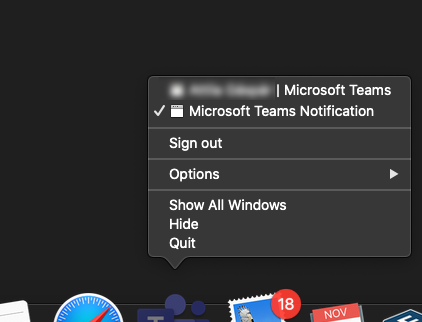
Ok, I found a "solution" to force Teams to use the notifications.
Simple version:
01. You go to your teams https://teams.microsoft.com02. When it asks for notifications, give the permission and that's it.
As an App in your dock:
02. You copy the URL from your logged-in teams-tab (01.)
03. You install Epichrome
(Very useful, you can wrap a Website as a App and it appears in the dock. Basically is MS doing the same with their "App" except it uses Electron, Epichrome uses Chrome or Brave.)
04. Start it, go through the wizard, when it asks for the URL, give your Teams-URL and a fine name for it.
(Icon can be automatically downloaded)
05. Start the new app, log in, give permission for notifications. Since it is basically a browser, it is forced to use the default MacOS Notifications. Alt-Tab works again.
Alternatively, there is a way to make a WebApp with chrome. But I never use chrome.

jthames This seems to be a temporary solution. After a while, alt-tab stops working again. I hope MS can fix this. It's a non-trivial impact to my work flow.

hartmms Yeah... same here.  I also noticed that the alt-tab problem only (in my case anyway) happens when Teams is on another desktop. I can alt-tab to Team IF I'm in the same desktop Teams is in. Seems that the alt-tab short cut brings Teams to the front but does not switch focus to the proper desktop. MS Outlook works fine.
 acloseNov 09, 2023Copper ContributorYou've figured out the exact scenario — It happens when Teams is on another desktop. This has been driving me crazy! Thank you. Now all we need is Microsoft to fix it 🙁
- jyriatnttNov 09, 2023Copper ContributorThis has been fixed in the new version of Teams, the classic version is obviously not going to be fixed.
 Colin_SeowNov 09, 2023Copper Contributor
jyriatntt Yes, I noticed it is fixed in the new version (work and school) and yes, I agree they probably will not fix the classic version.
 an-ipaDec 04, 2020Copper Contributor
Teams is a nightmare to use currently when you have multiple physical screens and multiple virtual desktops. Apple manages to have the menu bar wherever and alt tab does not go back to Teams. This combination of excellent user experience makes it rather slow to find the unmute button during a call.
- hartmmsDec 04, 2020Brass ContributorThat's why I enabled the "new features" to have meetings in a separate window. When the main meeting window is not on the current desktop or in focus, you get a little control panel on your screen with a mute button and other controls.
 jbloomerFeb 19, 2021Copper ContributorMy problem is that separate little control panel gets buried behind all of my other screens, and the only way to get to it is to minimize any other windows. HIGHLY frustrating.
 RKeilmanDec 03, 2020Brass Contributor
jthames +1
It's absolutely killing my workflow. It's like I'm walking home from the grocery store and every 10 steps I have to completely empty then re-bag my items. I'm getting where I need to go, but I'm absolutely losing my mind along the way.
Microsoft, PLEASE address this before I throw myself out the window.
 Mr_IOJul 08, 2021Copper ContributorIt's M$ that must fly off the windown.