Forum Discussion

HSVSIMON
Jun 04, 2021Copper Contributor
Enable Require Registration: For everyone
Proper way to enable "Require registration: For everyone" when scheduling a new meeting. I have been unable to find a way to activate this setting. Thanks for any help!
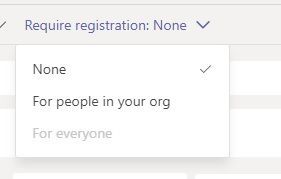
- Jun 04, 2021
HSVSIMON Hello, gonna add all the necessary config here.
-AllowMeetingRegistration
-WhoCanRegister
-AllowPrivateMeetingSchedulingTo allow users in organization to schedule webinars:
Set-CsTeamsMeetingPolicy -AllowMeetingRegistration $TrueTo allow only users in organization to register for webinars:
Set-CsTeamsMeetingPolicy -AllowPrivateMeetingScheduling $True
Set-CsTeamsMeetingPolicy -WhoCanRegister EveryoneInCompanyTo allow anyone, including anonymous users, to register for webinars
Set-CsTeamsMeetingPolicy -AllowPrivateMeetingScheduling $True
Set-CsTeamsMeetingPolicy -WhoCanRegister EveryoneAnonymous join must be enabled in Teams meeting settings for anonymous to join webinar.Microsoft Lists must be enabled
Set-SPOTenant -DisablePersonalListCreation $falseTeams view-only meeting experience if wanting to use overflow (when more than 1000).
Set-CsTeamsMeetingPolicy -Identity Global -StreamingAttendeeMode EnabledCollect meeting attendance
Set-CsTeamsMeetingPolicy -AllowEngagementReport Enabled

Aug 30, 2021
Hello, the registration form is part of the webinars and you can follow the progress for GCC here https://www.microsoft.com/en-us/microsoft-365/roadmap?filters=&searchterms=83611
No need to have a form for normal meetings. This is usually how it looks from the organizer's perspective.
1. Schedules the webinar well in advance, usually by several weeks.
2. Prepares a registration form that each prospective attendee must fill out before receiving the webinar join info.
The form can be used to gather all sorts of useful info for post-webinar sales contacts, for example, or for measuring training effectiveness.
3. Sends out the webinar invite. If the webinar will feature additional presenters, the invite goes to them. (After this step, the registration link for potential attendees becomes active.)
4. Shares the event details and registration link with potential attendees. This can be on social media, on a web site, via email, or some other way.
5. Downloads the registration report for data about who registered and how they responded to the registration questions.
No need to have a form for normal meetings. This is usually how it looks from the organizer's perspective.
1. Schedules the webinar well in advance, usually by several weeks.
2. Prepares a registration form that each prospective attendee must fill out before receiving the webinar join info.
The form can be used to gather all sorts of useful info for post-webinar sales contacts, for example, or for measuring training effectiveness.
3. Sends out the webinar invite. If the webinar will feature additional presenters, the invite goes to them. (After this step, the registration link for potential attendees becomes active.)
4. Shares the event details and registration link with potential attendees. This can be on social media, on a web site, via email, or some other way.
5. Downloads the registration report for data about who registered and how they responded to the registration questions.

ChristianM365
Nov 02, 2021Copper Contributor
hi ChristianJBergstrom , by GCC, do you mean for Government of Canada?
- Nov 02, 2021O365 and M365 Government plans are designed for the unique needs of government organizations. They provide all the features and capabilities of the services in a segmented government cloud community (GCC) that enables organizations to meet compliance and security standards.