Forum Discussion

seunayo
Jul 05, 2021Brass Contributor
Can no longer share system audio from a Mac
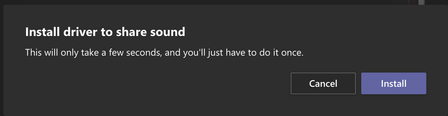
Hi. I used to be able to share my screen and include system audio. I haven't done it in a while. When I tried to share today and I noticed this messaged that asked me to install a driver. When...
 Jul 12, 2021The workaround, for now, is...
Manual installation of the MSTeamsAudioDriver package
1. Download the driver package from https://statics.teams.cdn.office.net/evergreen-assets/DesktopClient/MacAudioLBDriver/2020.42.00.9/MSTeamsAudioDevice.pkg
2. Install the package and restart Teams client

pvanberlo
Jul 06, 2021MCT
On the M1 Mac: You have Microsoft Teams Version 1.4.00.16263. It was last updated on 28/06/2021.
On the Intel Mac: You have Microsoft Teams Version 1.4.00.8872. It was last updated on 06/07/2021.
My initial hypothesis was that it might be due to Teams not being native ARM for M1 devices causing the issue on my main system. But I can confirm that on the Intel Mac it also doesn't work.
Seems to be "support case worthy" 🙂
Edit: Ran update again on the Intel device, it's now up to the same version as the M1 device. After restarting Teams, the toggle completely broke on the Intel device, eg. I can toggle it, it doesn't prompt for driver installation but it also immediately disables system audio as well....
seunayo
Jul 06, 2021Brass Contributor
Oops!
1.4.00.16263 seems to be the culprit. I've opened a support case.
1.4.00.16263 seems to be the culprit. I've opened a support case.
 jlwideJul 12, 2021Copper ContributorSame issue on multiple devices running version 1.4.00.16263. Please do let us know how it goes.
- seunayoJul 12, 2021Brass ContributorPlease see my update with the workaround.
- PeterRisingJul 12, 2021MVPTop tip, thanks for sharing!
 Tim_V1102Jul 08, 2021Copper ContributorSame issue, same version. Please post back if you get a fix.
- PeterRisingJul 06, 2021MVPGood plan. Please let us know how you get on.
