Forum Discussion

joec55
Feb 08, 2020Brass Contributor
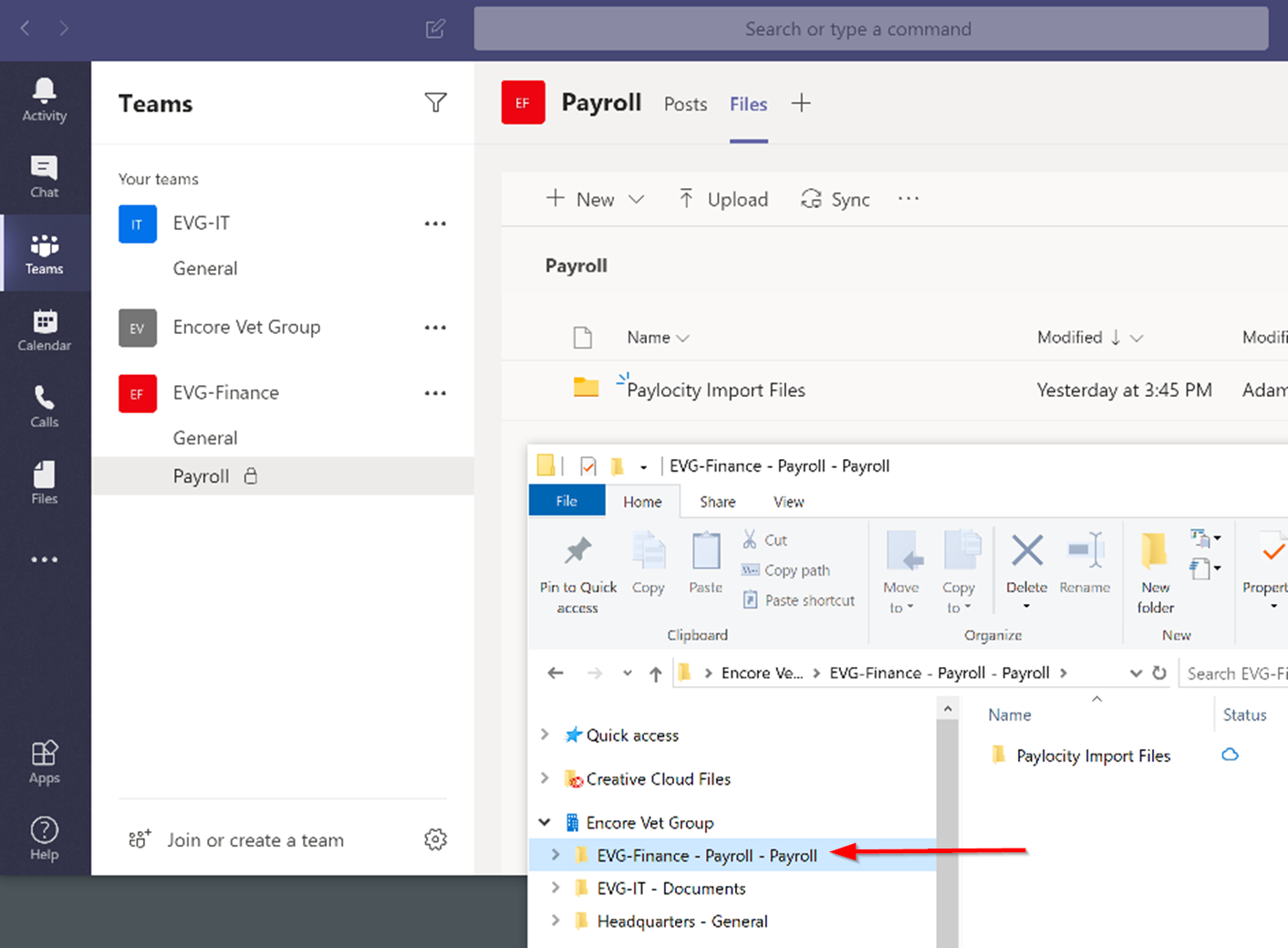
Private channel - sync to explorer doubles the site name
Hello everyone, I'm experiencing some odd behavior that I hope someone can explain. While in the Teams app, I created a private channel called "Payroll" in a team called "EVG-Finance" and then cl...
- Feb 09, 2020Hi guys,
This is as designed. Private channels create separate site collections. In explorer, it is showing the name of the site collection not a duplication.
Example of standard channel
EVG-Finance (site collection) - General (Folder)
Example of private channel
EVG-Finance - Payroll (Site Collection) - Payroll (Folder)
Hope that makes sense. It is the way that Teams is architected. I can see how it’s confusing as part of the site collection is named the same as the folder and gives the impression when synced to explorer that it’s duplicated when it’s not.
Hope that answers your question. We all have the same 😄
Best, Chris


joec55
Apr 28, 2020Brass Contributor
PDostiyar Why are you suggesting not to sync channels to Windows Explorer? I was planning on having all my departments sync their respective folders to their local computers. Should I not do that?
It's how they want to work. I don't know a single user that would rather work inside of Teams than use Windows Explorer.

Karen_D17
Mar 25, 2021Iron Contributor
joec55 I have been working with users and frequently show them how to sync their document libraries and folders to their computer and make it available via Windows Explorer. This is because it means they don't have to change the way they work and they will adopt the use of Teams (or SharePoint) better this way.
As for the private channel issue . . . there are 2 ways around it. The first is that you never create any private channels. Instead, create a separate team for the users that would be using that private channel. That eliminates not only the sync issue, but also the issue of not being able to add tabs to the team channel for apps that require a M365 group - like a Planner board. The second option is to find a workaround and wait for the new Shared Channels to come along. They are currently slated to come out in the next couple of months (although I won't be surprised if it gets delayed a bit) and at that time we will be able to add members to channels that are not part of the team and they will be restricted to being able to only see that single channel. I know I have requests for this frequently. One may be able to utilize this new feature instead of a private channel.
I hope this helps.
As for the private channel issue . . . there are 2 ways around it. The first is that you never create any private channels. Instead, create a separate team for the users that would be using that private channel. That eliminates not only the sync issue, but also the issue of not being able to add tabs to the team channel for apps that require a M365 group - like a Planner board. The second option is to find a workaround and wait for the new Shared Channels to come along. They are currently slated to come out in the next couple of months (although I won't be surprised if it gets delayed a bit) and at that time we will be able to add members to channels that are not part of the team and they will be restricted to being able to only see that single channel. I know I have requests for this frequently. One may be able to utilize this new feature instead of a private channel.
I hope this helps.
 BohrimAug 18, 2021Copper Contributor
Pernille-Eskebo Please resolve this issue. It makes syncing of private channels confusing for end users.