Forum Discussion

Private channel - sync to explorer doubles the site name
- Feb 09, 2020Hi guys,
This is as designed. Private channels create separate site collections. In explorer, it is showing the name of the site collection not a duplication.
Example of standard channel
EVG-Finance (site collection) - General (Folder)
Example of private channel
EVG-Finance - Payroll (Site Collection) - Payroll (Folder)
Hope that makes sense. It is the way that Teams is architected. I can see how it’s confusing as part of the site collection is named the same as the folder and gives the impression when synced to explorer that it’s duplicated when it’s not.
Hope that answers your question. We all have the same 😄
Best, Chris

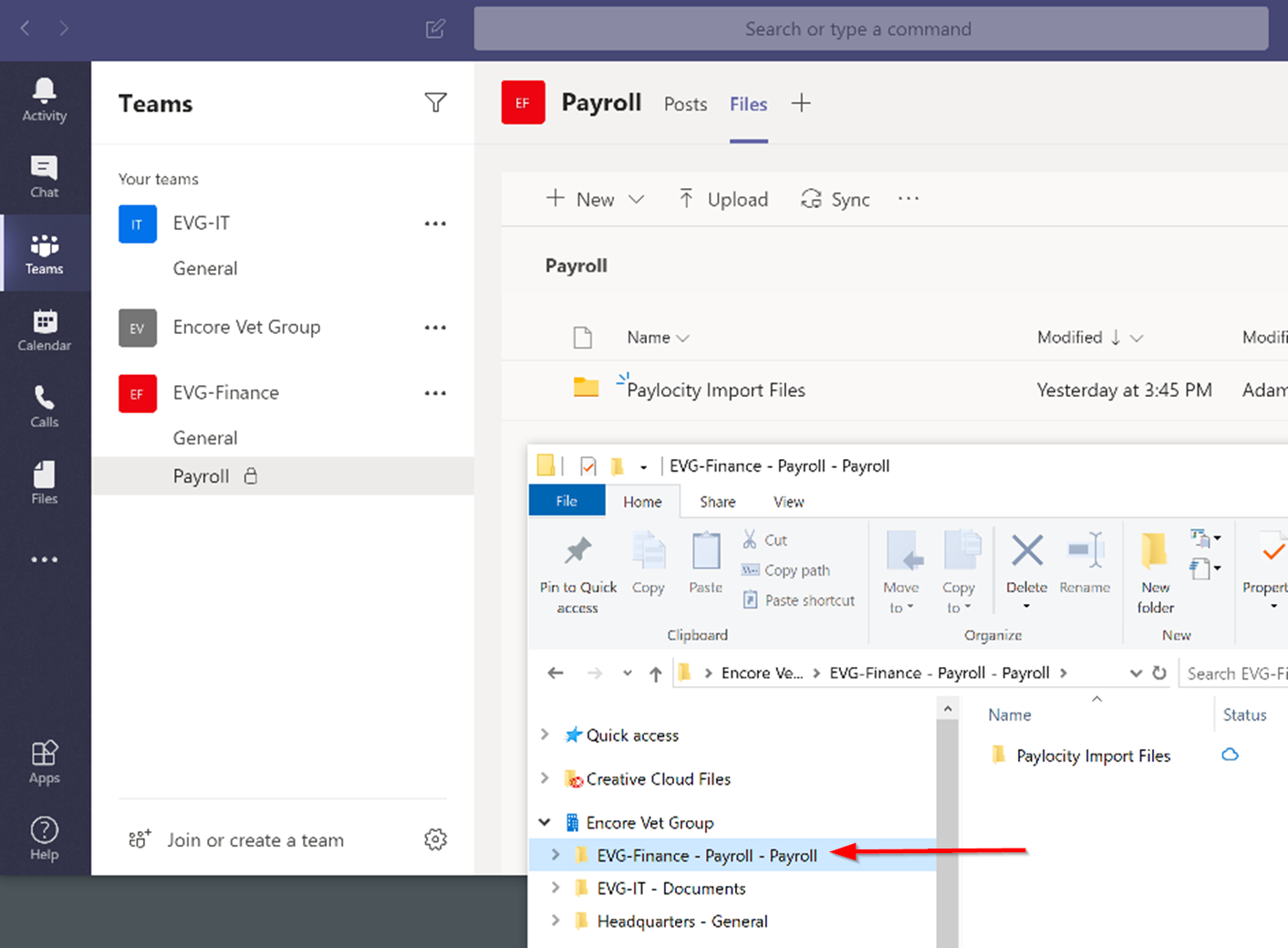

This is because the folder name used when syncing a library is based on the SharePoint site name, followed by the library / folder name - as shown below, the SharePoint site name for the private channel includes the name of the Team, plus the name of the channel.
You could, in theory, change the title of the site used for the private channel - but that would have to be done before you sync the library - and I'm not sure it would be a supported change, due to the special nature of the sites created for private channels.
Probably worth raising a ticket with MS to ask if there are any other options.

Rob Ellis ChrisHoardMVP I get the architecture, but from a UX perspective, it's confusing and shows too much of the inner workings of the application, IMHO.
It would be great for users if the names weren't so long. Especially in Explorer.
I can't find a Teams UserVoice on this one, looking for simplification. Has anyone come across one?
Ed
 a-yatesJul 17, 2020Brass Contributor
Found a UserVoice post for this here: -
https://microsoftteams.uservoice.com/forums/555103-public/suggestions/39919093-private-channel-folder-name-is-duplicated-when-syn
And this one too which is related because the way private channels are created.
https://microsoftteams.uservoice.com/forums/555103-public/suggestions/38994235-private-channels-should-not-create-a-site-collecti
Like the say these private channels should just create a sub folder with appropriate permissions within the parent team. Then users can just have one sync folder the team folder and not multiple sync folders for every private channel.
I know the new way of working is to do everything in teams and sharepoint etc, but we sync folders for our users as they are used to working that way and too big learning curve for everyone just to switch. Also when working with other applications that need to save into those locations we need the sync so users can browse to those locations.
Really hope MS improve this area.
Anthony
- Ed_KennyJul 17, 2020Brass Contributor
a-yatesThanks for that.
I have voted them up. I agree that it isn't practical to move people from a file explorer sytle way of working to "all in teams" quickly.
It will be a long road and Microsoft should be taking the slower adoption curve from a large percentage of the core userbase into consideration.
 JS_blogSep 23, 2020Copper Contributor
It doesn't work for us... we use so many photos, and Teams photo experience is a non starter.. we have to use file explorer to make it even possible to scroll through photos quickly.