Forum Discussion

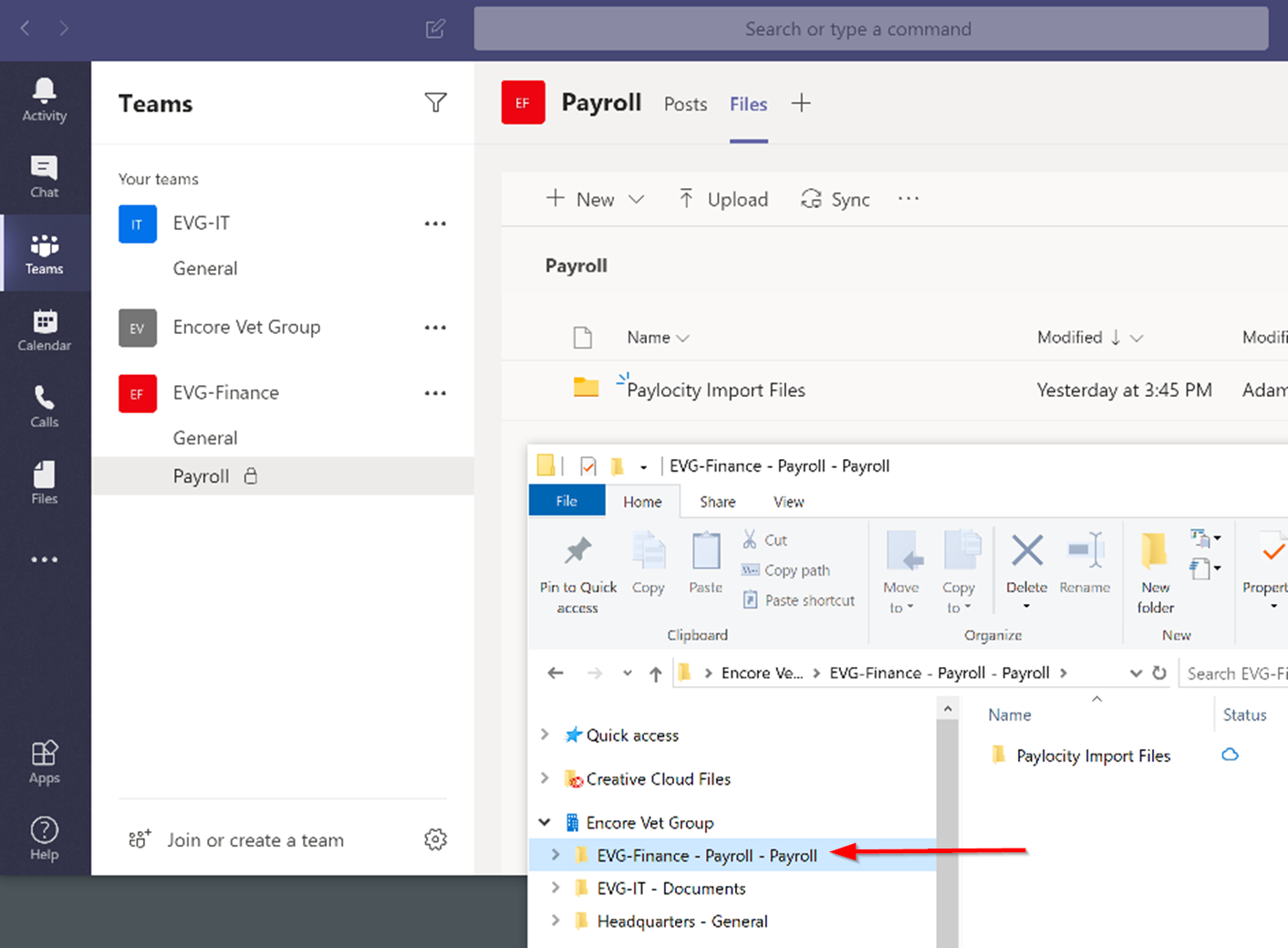
Private channel - sync to explorer doubles the site name
- Feb 09, 2020Hi guys,
This is as designed. Private channels create separate site collections. In explorer, it is showing the name of the site collection not a duplication.
Example of standard channel
EVG-Finance (site collection) - General (Folder)
Example of private channel
EVG-Finance - Payroll (Site Collection) - Payroll (Folder)
Hope that makes sense. It is the way that Teams is architected. I can see how it’s confusing as part of the site collection is named the same as the folder and gives the impression when synced to explorer that it’s duplicated when it’s not.
Hope that answers your question. We all have the same 😄
Best, Chris


First and foremost I would not sync and rather use the teams Files tab which gives you rich experience unless if you need to sync to local drive and windows explorer then you should be able to do it but have to be a member or owner of that private channels.
Please let me know if further informations are needed.
Regards

PDostiyar Why are you suggesting not to sync channels to Windows Explorer? I was planning on having all my departments sync their respective folders to their local computers. Should I not do that?
It's how they want to work. I don't know a single user that would rather work inside of Teams than use Windows Explorer.
 FranFMSSep 21, 2023Brass ContributorAgreed. When you are in Teams it is hard or impossible to open two files at the same time quickly and easily - and that is something we do all the time.
- Karen_D17Mar 25, 2021Iron Contributorjoec55 I have been working with users and frequently show them how to sync their document libraries and folders to their computer and make it available via Windows Explorer. This is because it means they don't have to change the way they work and they will adopt the use of Teams (or SharePoint) better this way.
As for the private channel issue . . . there are 2 ways around it. The first is that you never create any private channels. Instead, create a separate team for the users that would be using that private channel. That eliminates not only the sync issue, but also the issue of not being able to add tabs to the team channel for apps that require a M365 group - like a Planner board. The second option is to find a workaround and wait for the new Shared Channels to come along. They are currently slated to come out in the next couple of months (although I won't be surprised if it gets delayed a bit) and at that time we will be able to add members to channels that are not part of the team and they will be restricted to being able to only see that single channel. I know I have requests for this frequently. One may be able to utilize this new feature instead of a private channel.
I hope this helps. BohrimAug 18, 2021Copper Contributor
Pernille-Eskebo Please resolve this issue. It makes syncing of private channels confusing for end users.
- PDostiyarApr 28, 2020Bronze Contributor
joec55Well, this is my personal suggestion but there might be different views on that, but personally I have found this useful for the Teams adoptions and users engagement as they always go to MS Teams > general or any other channels and that is the times they see the posts/conversations while checking for the folder/files in the File Tab.
but again there could be different cases and users' requirements or if people with minimum internet access, in that case, Sync and always keep on the device would be the best option but for the rest using MS Teams, the File tab will be highly recommended.
- CharlesMYeomansJul 20, 2023Copper Contributoryeah but when you are travelling and offiline does it work ? Many of us work away from the internet.