Forum Discussion

d3ell
Apr 29, 2020Copper Contributor
Prevent users from deleting files within a channel
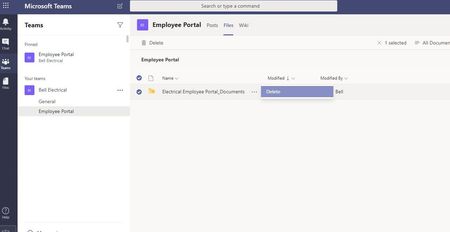
Hi All, I have an issue whereby i am sharing some cloud storage within the Files part of a channel. What i have found though is that all users and guests can delete this cloud storage link an...

Apr 29, 2020
Na they are referring to cloud storage links that look like folders and restricting those. This isn’t possible. The only thing you can restrict when it comes to cloud storage option is turning it on or off for everyone.
Could a tab be an alternative solution? I think tabs can be restricted to owners only.
Could a tab be an alternative solution? I think tabs can be restricted to owners only.

PeterRising
Apr 29, 2020MVP
- Apr 29, 2020Well that’s how I read it. Couldn’t really see the screenshot on my phone to tell. But it looks like just a url link. Anyway OP please confirm 😉
 d3ellApr 29, 2020Copper ContributorHi, Thanks for your input guys.
I’m new to teams so hopefully his will make sense. - in a channel I have been clicking files (next to where it says wiki and then Under that clicking + cloud storage. Then from there I have been linking to the sharepoint site.
It’s only the root (main) folder that’s is unprotected. This appears to be the folder that contains the link as it has a link symbol on it.
I’m not back in the office Until tomorrow to try anything but does that make more sense?- Apr 29, 2020Yeah this is what I thought you mean with my first response ;). It’s not possible to restrict permission on that cloud storage link.
You could click the + to right of wiki and link to document library there instead and in The teams settings I believe you can restrict tab deletion there.