Forum Discussion

Participants not showing up on camera BUT camera shows for others
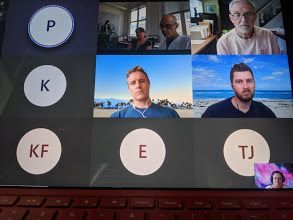
- Aug 04, 2021
Alan_Denness P_Gascoyne Yair_Azriel Tamara100 and all: This is the response from the meetings features team:
-
If you have issues with video in Teams meetings, please try to update Teams to the latest version and ensure that incoming video is not turned off in your Teams client. (You can check it via three dots menu in meeting toolbar > Turn incoming video off/on). After you install the latest Teams updates, please restart your computer. If you still experience the video issues, please ask your IT manager to open a support case or call Microsoft using the support line you were given.
Other options for business subscription admins are listed here:
https://support.serviceshub.microsoft.com/supportforbusiness/create
Additional tech support is available at support.microsoft.com or Answers.microsoft.com
-


Tamara100 Did you find a solution for this? I am having the same problem. Everyone can see everyone's camera, but I can only see their initials. However when someone is sharing their screen I can view everyone's camera. It's not about my bandwith either.
