Forum Discussion

Participants not showing up on camera BUT camera shows for others
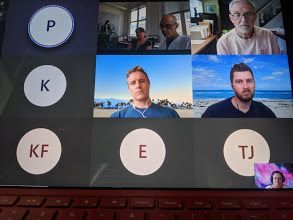
- Aug 04, 2021
Alan_Denness P_Gascoyne Yair_Azriel Tamara100 and all: This is the response from the meetings features team:
-
If you have issues with video in Teams meetings, please try to update Teams to the latest version and ensure that incoming video is not turned off in your Teams client. (You can check it via three dots menu in meeting toolbar > Turn incoming video off/on). After you install the latest Teams updates, please restart your computer. If you still experience the video issues, please ask your IT manager to open a support case or call Microsoft using the support line you were given.
Other options for business subscription admins are listed here:
https://support.serviceshub.microsoft.com/supportforbusiness/create
Additional tech support is available at support.microsoft.com or Answers.microsoft.com
-


Daniel_BlumbergYes, a friend told me that it is a sign of insufficient bandwidth. I upgraded to faster internet package with my provider and the issue got resolved.

helloworldkitty Daniel_Blumberg
Is this bandwidth issue the most likely reason/a fix for others?
we have had this happen with multiple users on a large call with no visible commonality between them or difference to those that can see all incoming video. The user above that responded to say this is what you see when cameras are off is correct but not relevant here since all users in my example have their cameras on (and I believe the same for others in this thread). Is there any response from Microsoft on this elsewhere?
 jehuieFeb 22, 2021Copper Contributor
This does not appear to be a bandwidth problem. We are having the same issue and have very high bandwidth. Some participants with lower bandwidth are seeing the video just fine even though others in the high bandwidth work environment can't see them. The worst thing is that it's inconsistent and hard to describe without people thinking it's just a camera issue or something.
Succinctly: Sometimes some users video is only viewable by certain users. Some people in the call can see it fine. Others can't. And it seems to be completely irrelevant to bandwidth availability.
It feels like a bug to me. I'm getting pressure from across our organization to switch to Zoom because it does not have this problem.
Anyone from Microsoft plan on chiming on here? We just started noticing this in the last month or two. What did you break?
- MarkLDornApr 15, 2021Copper Contributorhas there been a resolution to this?
I have the same problem. I can only see the video of the person speaking when I minimize the screen. I dont see anyone with a normal screeen - Rhys_JonesFeb 25, 2021Copper Contributor
jehuie we have also experienced this issue today.
Simple call with 4 participants
1 with camera feed turned off which is our NDI account.
1 Caller which is our producer machine.
2 Remote Callers
On the producer machine both remote callers are fluid/usual bandwidth fluctuations.
On the NDI Account one of our remote callers keeps freezing/occasionally not showing picture at all, even when picture is solid on the producer machine.
The producer machine is on a separate pipe with a lot lower bandwidth than our production machine which has around 200Down and 150 Up.
Any ideas on this Microsoft?