Forum Discussion

Maudasilva
Dec 11, 2019Copper Contributor
No option to share certain files types
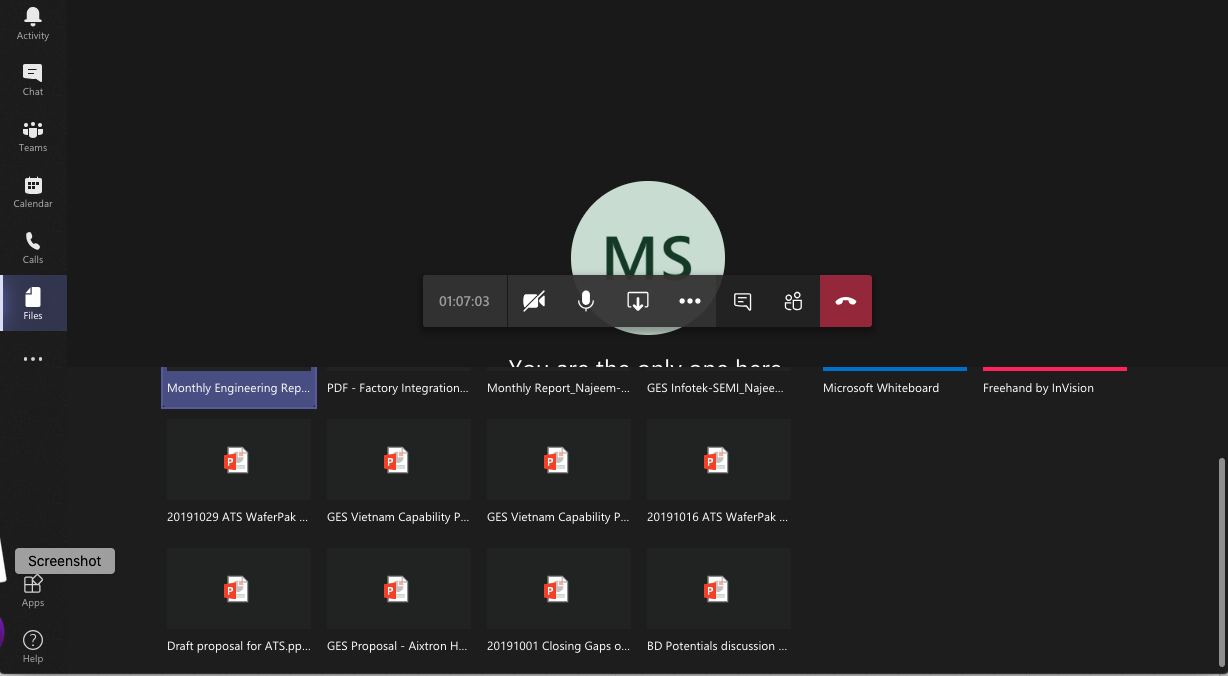
When in an MS Teams (running on a Mac) meeting, I do not have the option to screen share anything other than PowerPoint files; no desktop, no Excel, etc. How can I enable other file types screen sha...
- Dec 12, 2019Wait, nevermind, I found it. This is what I was thinking. Go check on this! Hope it works.
https://answers.microsoft.com/en-us/msoffice/forum/all/macos-catalina-and-teams-screen-sharing/28a38edc-d149-4c32-95cd-95c4d87dbf13

Maudasilva
Dec 12, 2019Copper Contributor
I am using the desktop version. When I click on the screen share icon, the "screen sharing window" opens us and I can move in it up and down. The only options I have are:
- PowerPoint files
- Whiteboard by MS
- Freehand by InVision
- Browse, that opens a submenu with 3 options: Browse Teams and Channels, One Drive and Upload from Computer. When I click this last option, I see my files, however, ONLY PowerPoint Files are selectable.
Nothing else is in the "screen sharing" window AND no desktop option either
- PowerPoint files
- Whiteboard by MS
- Freehand by InVision
- Browse, that opens a submenu with 3 options: Browse Teams and Channels, One Drive and Upload from Computer. When I click this last option, I see my files, however, ONLY PowerPoint Files are selectable.
Nothing else is in the "screen sharing" window AND no desktop option either

Dec 12, 2019
Wait, nevermind, I found it. This is what I was thinking. Go check on this! Hope it works.
https://answers.microsoft.com/en-us/msoffice/forum/all/macos-catalina-and-teams-screen-sharing/28a38edc-d149-4c32-95cd-95c4d87dbf13
https://answers.microsoft.com/en-us/msoffice/forum/all/macos-catalina-and-teams-screen-sharing/28a38edc-d149-4c32-95cd-95c4d87dbf13
- MaudasilvaDec 12, 2019Copper ContributorPerfect Chris, that is what was missing. Thanks