Forum Discussion

Maudasilva
Dec 11, 2019Copper Contributor
No option to share certain files types
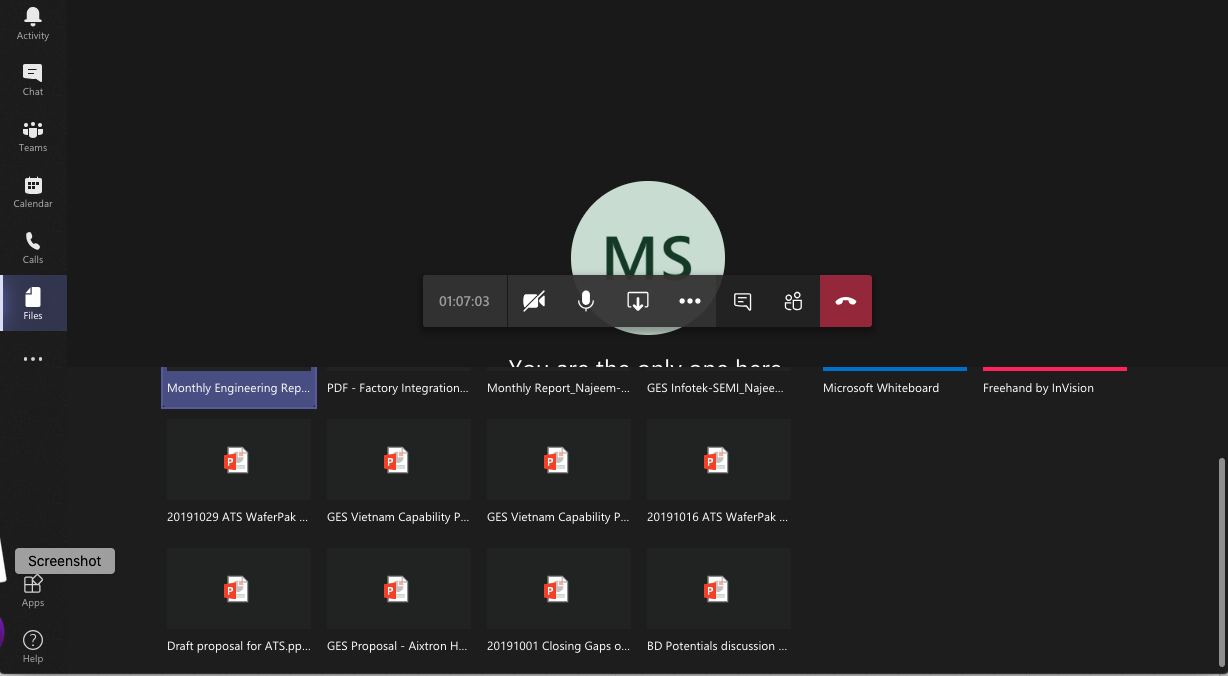
When in an MS Teams (running on a Mac) meeting, I do not have the option to screen share anything other than PowerPoint files; no desktop, no Excel, etc. How can I enable other file types screen sha...
- Dec 12, 2019Wait, nevermind, I found it. This is what I was thinking. Go check on this! Hope it works.
https://answers.microsoft.com/en-us/msoffice/forum/all/macos-catalina-and-teams-screen-sharing/28a38edc-d149-4c32-95cd-95c4d87dbf13

Dec 11, 2019
What if you scroll up in that Window? Usually screen sharing etc. is on the top row and you're scrolled down there?
Assuming this is desktop install and not browser connected?
Assuming this is desktop install and not browser connected?
 MaudasilvaDec 12, 2019Copper ContributorI am using the desktop version. When I click on the screen share icon, the "screen sharing window" opens us and I can move in it up and down. The only options I have are:
- PowerPoint files
- Whiteboard by MS
- Freehand by InVision
- Browse, that opens a submenu with 3 options: Browse Teams and Channels, One Drive and Upload from Computer. When I click this last option, I see my files, however, ONLY PowerPoint Files are selectable.
Nothing else is in the "screen sharing" window AND no desktop option either- Dec 12, 2019Wait, nevermind, I found it. This is what I was thinking. Go check on this! Hope it works.
https://answers.microsoft.com/en-us/msoffice/forum/all/macos-catalina-and-teams-screen-sharing/28a38edc-d149-4c32-95cd-95c4d87dbf13- MaudasilvaDec 12, 2019Copper ContributorPerfect Chris, that is what was missing. Thanks
- Dec 12, 2019
It's either 1 of 2 things from what I remember.
1. Video Driver update.
2. System permissions for Teams. I don't have a mac anymore so I can't go look where it was, but there was some permission it needed granted in order to share the screen.Matthew Wade is a Mac user, he might know :)....